• Home
  • Software Testing Service
  • About US
    • Privacy Policy
    • Disclosure
  • Write For Us
  • Submit Software
  • Contact Us
    • Subscribe
I Love Free Software
Best free software available all over the web. The free software categories include Windows Software, Social Networking Tools, and software installation videos.


  • Featured
  • Windows
  • Web Applications
  • App Store
  • Android
  • iPhone
  • iPad
  • Windows 8
  • Social Networking
  • Programming Tools

Aktiv MP3 Recorder – Record Any Sound From Your Computer

By Anvin on April 7, 2010 | Sponsored Links

Aktiv MP3 Recorder is a free software that lets you record sounds from audio CDs, audio tapes, online audios, online videos, computer games, music tracks, etc into audio files of desired formats such as WAV, MP3, WMA, OGG, VOX, AU and AIFF. It is a very handy tool to record any sound that is played on your PC.

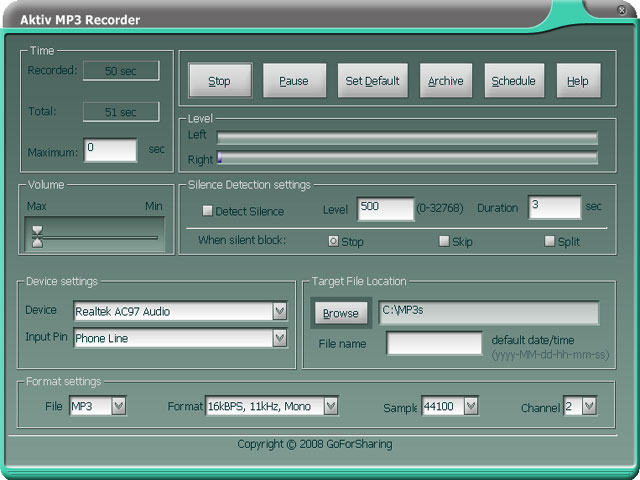
The interface of Aktiv MP3 Recorder is very simple to understand, and intuitive. If you just want to record your own voice, I would prefer Moo0 Voice Recorder.

Sponsored Links

How does Aktiv MP3 Recorder Works?

Before you record any sound, you need to define the sound source. The format settings will let you choose the desired file type, choose audio settings like bit rate, sample size, etc. You can make use of the volume slider to increase the volume of the sound that you are going to record. You can then hit the Record button to initiate the recording. Then you can play back the recorded sound using any good media player (my favorite ones are RealPlayer, and BS.Player).

Following features can be found in Aktiv MP3 Recorder:

  1. Before you record any sound, you can choose details like frequency, bitrate, sample size, volume level, etc
  2. You can record sounds in formats like WAV, MP3, WMA, OGG, VOX, AU and AIFF.
  3. Its interface is very user-friendly and you will be able to master all its features in no time.
  4. The Smart Silence Detection feature gives you the ability to stop and start recording to the sounds to a new file when the volume of the recorded audio drops below a predefined value.
  5. If you want to record sounds from internet radio, you can also schedule recording by inputting the date and time and the time duration by making use of the Scheduler feature. It also has the ability to disconnect from the Internet once the recording is completed.
  6. It also allows you to define shortcut keys for record, pause, resume and stop.

With Aktiv MP3 Recorder on your system, you will be able to record sounds of your favorite audio sounds played on your computer regardless of its source.

Home Page: Click Here
Works With: Windows
Free / Paid: Free

Link to This Page:


You Might Also Like:

  1. Sonarca Sound Recorder: Free Sound Recording Software
  2. Free Audio Recorder for Windows: Swiftrun Free Sound Recorder
  3. Free Software to Record your Voice: Moo0 Voice Recorder
  4. Free Sound Recorder For Windows
  5. Record Sounds on your Computer – Kat MP3 Recorder

Be the first to know about Latest Free Software:

  • Join us on Facebook
  • Subscribe to our RSS Feed
  • Follow us on Twitter
  • Subscribe to Email Updates:

Posted in MP3 & Audio Software | Tagged record sounds, voice recorder | Leave a response

Anvin

« Previous Next »

Featured Posts

  • 5 Free Snippet Managers To Manage Code Snippets
  • 5 Free Online Tools To Test Website In Different Resolutions
  • 5 Free Microsoft Access Alternatives
  • 5 Free IP Notifier Apps
  • 5 Online Mapping Websites
  • 5 Free Alternatives To iGoogle
  • 7 Websites To Download Windows 8 Themes
  • 5 Best Free Calculator Apps For Windows 8

Join More than 15,000 Followers!

Enter your Email Address
  • Submit Software
  • Software Testing Service
  • Write For Us
  • About Us
  • Privacy Policy
  • Disclosure
  • Contact Us

Link to Us:

Did we review your software here? Feel free to flaunt this badge on your website:

Free Software

Use this Code:

Copyright © 2013 I Love Free Software.

Powered by WordPress and Hybrid. New - H