SideSlide is free desktop management software which helps you organize the desktop in really exciting manner. Your desktop can be configured in such a way where you can access and manage just about anything; be it, short cuts, RSS feeds, frequently visited locations etc. With this software you can create a workspace with quick access to many of the needy things and you can manage them in an effective manner. Most importantly, all the settings of this application are kept safely in a single folder.
There is no limit to the number of windows you can bring into the workspace. These are some of the usual applications of this desktop enhancement software:
- You can insert URLs in to the workspace.
- You can insert images in to the workspace.
- You can add reminders.
- You can write notes on the workspace.
- You can categorize and list the similar types of applications.
Also, all the windows in the workspace are collapsible and expandable. Which means you can effectively control the clutter formation and focus only the windows you want to focus keeping other windows collapsed.
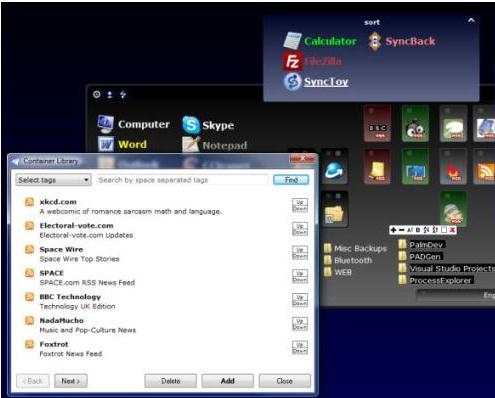
The most interesting feature would be the ability to hide the workspace. You can keep the workspace anywhere on the desktop and click outside the workspace; it will be hided. Also, you will find all the necessary buttons on the bottom right corner and you’ll find variety of buttons like create a new note, insert URL, draw folder container, create folder shortcut etc. You can also open the application after saving the settings here.
You can also check out: Desktop Manager, 3D Desktop, and Mac toolbar on Windows.
For your convenience a context menu is available on the right click. Besides creating a new note, URL, shortcut etc you would be able to edit the tags, paste clipboard text, change the settings, open the container library, change the appearance, save workspace etc.
You can change the whole appearance of the workspace by going to the change appearance screen. Same way you can play with the settings. Since you keep all the settings in a folder you can stop worrying about messing up with the registry. Moreover it allows you to transport the whole settings to a new computer; all you need to do is to copy the content and keep it in another computer.
SideSlide brings a whole new perspective to desktop management, and keeps your desktop organized even if you have too many items on it.
