• Home
  • Software Testing Service
  • About US
    • Privacy Policy
    • Disclosure
  • Write For Us
  • Submit Software
  • Contact Us
    • Subscribe
I Love Free Software
Best free software available all over the web. The free software categories include Windows Software, Social Networking Tools, and software installation videos.


  • Featured
  • Windows
  • Web Applications
  • App Store
  • Android
  • iPhone
  • iPad
  • Windows 8
  • Social Networking
  • Programming Tools

Protect Android Apps With A Fake Message Of Force Close

By Lalit Aggarwal on July 7, 2012 | Sponsored Links

Here, is a quick tutorial to protect Android apps with a fake “force close” message. You normally protect any app using some app to hide app on Android, or by Password protecting app hiding app it or protecting it with a password or pattern lock apps. But this time, we will discuss about a different way to protect your installed apps with a force close message.

Force close error message appears when any application does not responds. In those cases, either we have to restart the app or clear the cache from the “manage application” option in settings menu of your Android phone.

You can now protect the app with “App Locker II: Fake Crash” app. The app forces an error message of “force close” when anyone accesses your protected app installed on your Android phone. Whenever your friends or anyone else access the protected app, he/she will see the error message as “force close”. With this your friend might think that there must be some problem with app and cannot be launched on your Android phone. This discourages them to try to find password or pattern lock and saves your installed app from being accessed by anyone.

Steps To Setup And Use App Locker II: Fake Crash App:

Step 1: Download and install “App Locker II: Fake Crash” App on your Android phone.

Step 2: Launch the app.

Step 3: You will see the list of apps installed on your Android phone.
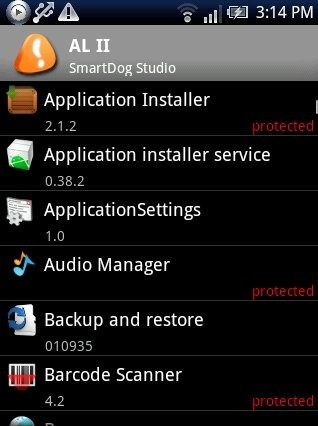
App Locker II
Sponsored Links

Step 4: Tap on the options menu and then tap on settings of the app.

Step 5: Enable “App Locker” option and then select the unlock or dismiss mode.
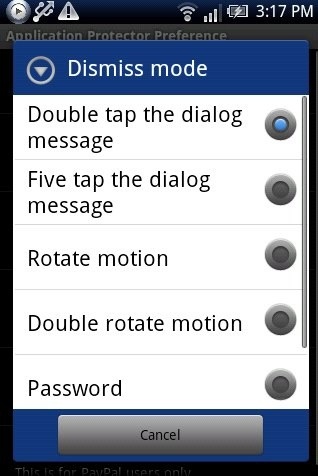
App Locker II Settings

Step 6: Exit from settings menu and then select the apps which you want to protect.

Step 7: Now you will see the protected apps showing the error message of “force close”.
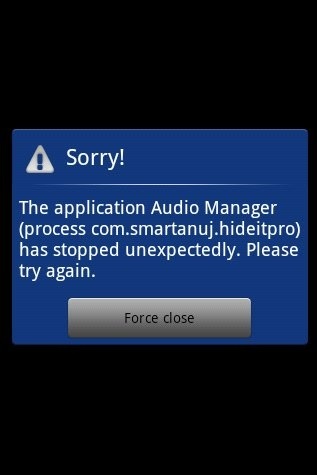
Fake Crash Force Close

To access the protected apps, you need to follow the unlock mode which you selected. I recommend you to protect App Locker II: Fake Crash app too. This is because, no one can access and change the protection settings from App Locker II: Fake Crash app.

You can also check out Hide It Pro app for Android to hide files and folders.

Home Page: Click Here
Works With: Android 1.6 and Up
Free / Paid: Free

Link to This Page:


You Might Also Like:

  1. How To Password Protect Files On Android
  2. iPhone Fake Message App To Receive Fake Messages: Fake-A-Message
  3. SMS Locker: Password Protect SMS on Android
  4. How To Enable Pattern Lock With Go Locker App On Android
  5. Android Fake Caller App: Fake-A-Call

Be the first to know about Latest Free Software:

  • Join us on Facebook
  • Subscribe to our RSS Feed
  • Follow us on Twitter
  • Subscribe to Email Updates:

Posted in Android | Tagged android | Leave a response

Lalit Aggarwal

« Previous Next »

Featured Posts

  • 5 Free Snippet Managers To Manage Code Snippets
  • 5 Free Online Tools To Test Website In Different Resolutions
  • 5 Free Microsoft Access Alternatives
  • 5 Free IP Notifier Apps
  • 5 Online Mapping Websites
  • 5 Free Alternatives To iGoogle
  • 7 Websites To Download Windows 8 Themes
  • 5 Best Free Calculator Apps For Windows 8

Join More than 15,000 Followers!

Enter your Email Address
  • Submit Software
  • Software Testing Service
  • Write For Us
  • About Us
  • Privacy Policy
  • Disclosure
  • Contact Us

Link to Us:

Did we review your software here? Feel free to flaunt this badge on your website:

Free Software

Use this Code:

Copyright © 2013 I Love Free Software.

Powered by WordPress and Hybrid. New - H