Pumas Viewer is a free minimal image viewer and editor which comes packed with a lot of image editing tools, all hidden from the sight. If you’re not nosy enough, you might not even discover all the different features that Pumas Viewer has, some of you might even come to a conclusion that this free image editor and viewer doesn’t work, because after you click on it’s shortcut, it will not open.
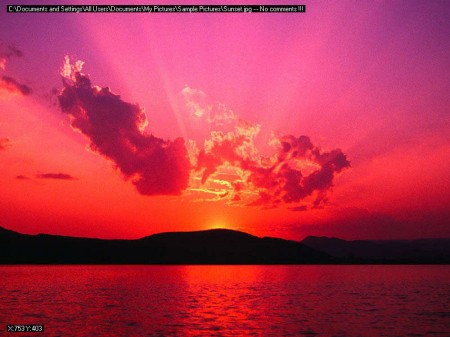
Like we said, Pumas Viewer doesn’t have the classic window with a border stretching around it. There’s no big red X sign in the top right corner, there’s no frame at all. All the options important for controlling Pumas Viewer and for image editing are hidden either behind keyboard keys or behind mouse clicks. For example in order to open the next image in a folder, you’re gonna have to do a right click anywhere on the opened image. The only way that you can start this free image editor is by opening an image. Right click on an image that you would like to open, find Open With and select Pumas Viewer, then you will see what you can see on the image above.
Similar software: RawTherapee, Funny Photo Maker, Face Off Max.
Free and lightweight image editor – Pumas Viewer
Lovers of all things simple and lightweight yet very functional will come to their own with Pumas Viewer. Program is very small, around half a megabyte in size, which is no surprise because it doesn’t have a fancy interface, filled with custom menus and a skin. The fact that the application is small and light weight doesn’t mean that it doesn’t pack a lot of different image editing tools. Some of the more interesting things that Pumas Viewer can do would be:
- Loading RAW image formats
- AForge image filtering
- Image comments
- Basic editing, resize, rotate and more
- Zooming, image thumbnail previews
Image editing with the help of Pumas Viewer is actually a lot more easier than with other programs, easier of course when you get familiar with all the different shortcuts that Pumas has.
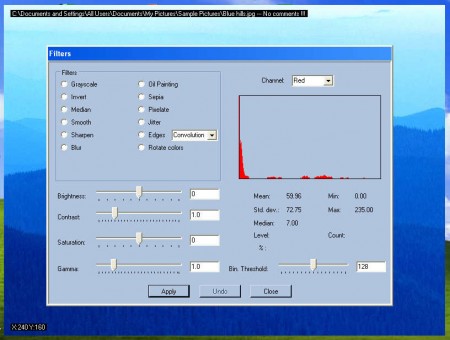
Take for example the Filter editor which you can see on the image above, in order to activate it you’re gonna have to press A on keyboard while having the image where you want to apply filters opened in Pumas. If you for example want to resize the image, you can do that by clicking on the I key, again with the image that you’re interested in editing opened.
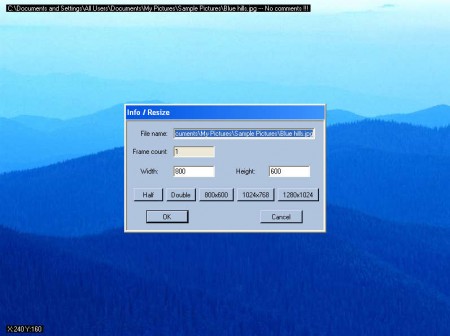
There’s even some template image sizes which you can just click and have the size number automatically filled out with corresponding image size. Pumas Viewer certainly does have an quite interesting approach when it comes to image display. When you combine that with the fact that there are also a lot of editing tools included you get to see just how unique and useful Pumas Viewer can be. Install it on your computer and use it’s unique borderless image display to impress your friends, all that completely free, learn the keyboard shortcuts by typing and you’re all set to enjoy the very unique Pumas Viewer and image editor.
