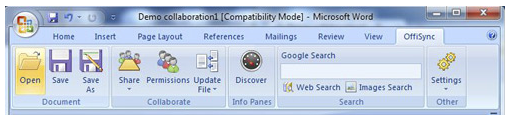
OffiSync is a free software to integrate Microsoft Office with Google Docs and Google apps. OffiSync does this by adding an extra tab to the ribbon interface in order to manage these new features.
Even though there are many free alternatives for Microsoft Office (like OpenOffice, and IBM Lotus Symphony), by far the most popular and most widely used by both home users and businesses is Microsoft Office. Free Software like OffiSync bring a whole new perspective by letting you integrate Microsoft Office with Google Docs.
Collaboration & Integration
Ever wanted to access your documents from a computer that they aren’t stored on? Ever wanted to access them from a computer that doesn’t have Microsoft Office installed? Well, this free Microsoft Office supercharger makes both of those things possible, due to its excellent integration with Google Docs.
Your files can be synchronized with Google Docs and the changes then merged if you are working on the two documents at various times and want to ensure that you have the latest version, as of both revisions.
This free Microsoft Office – Google Docs integrator is also useful if you wish to collaborate as real-time synchronization (made possible via Google Docs) is a feature of this software. It means that several users can work on the document at the same time and not cause edit conflicts. This is excellent; but real time collaboration is not available in Free version. There are many other free choices to collaborate in real time on Word Documents, including, Crocodoc, and Peepel Web Writer.
If you use Acrobat.com, instead of Google Docs, you can try CloudDrive.
Here are some of the features of OffiSync:
- Integrate Microsoft Office 2003, 2007 and 2010 with Google Docs and Google Apps.
- Adds a new tab/menu/toolbar in all Microsoft Office applications.
- Open and save documents directly to/from Google Docs.
- Simultaneous group editing and collaboration.
- Merge changes between documents stored locally and documents on Google Docs.
- Access your files from any computer, with or without Microsoft Office installed.
- Share and set permissions using email addresses or Google-imported contact details.
- Import templates, images and web content right from within documents.
Thoughts
OffiSync is an excellent free Microsoft Office supercharger as the integration with Google Docs offers up a series of fantastic features, such as real-time change synchronization during collaboration and the ability to store files within “the cloud”.
Any home user or business should consider using a free Microsoft Office – Google Docs integrator like this in order to improve their experience.
