KeypItSafe Password Vault is a password manager that you can use to safeguard your online login information. This software has a funny name, but it’s very effective at what it does and with it you can rest a bit more easily knowing that your login information is under protection.
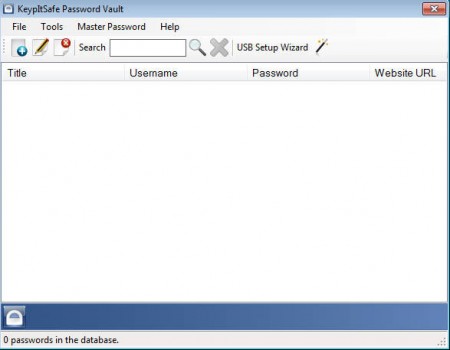
One of the worst things that can happen to our online accounts is someone stealing our login information, usernames and passwords. You’d be surprised how easy it is to do that. Not only that this way we can lose access to our social network accounts like Facebook, Twitter and MySpace, but it’s also possible to lose login information to payment processors and all of the money that’s kept there. It’s never a good thing to leave your computer unprotected from various vermin which is always present on the Internet and just waits for its next victim, protect yourself with KeypItSafe.
Installation warning
This program requires .NET installed to run, and it also needs to have Visual Basic Power Packs file installed on a machine in order to run successfully. Without this added to the system, you will experience problems at KeypItSafe start up, there will be a lot of unhandled exception errors waiting for you, so watch out and install the previously mentioned file to prevent them.
How does protection with this password manager work?
Using the program is very easy, after you run it for the first time, you’ll have to setup a master password which will be asked every time that the program is accessed.
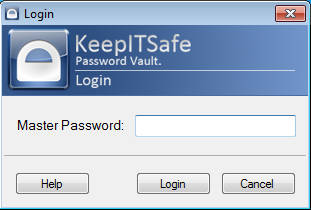
Once you create your password the program will need to be restarted and then you will be greeted with the default screen, like the one that you can see on the image above. How to add new passwords in the protection of KeypItSafe is no big mystery, just click on the New password button, top left with the blue plus sign and at the window that pops up enter in the details of the password which you’re protecting:
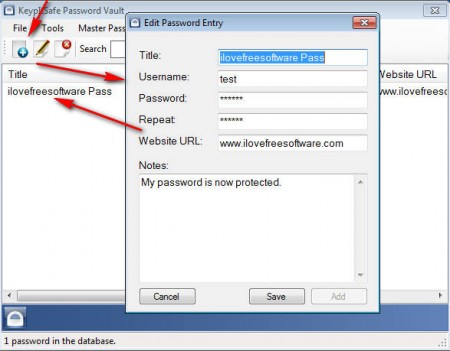
After you’re done filling in all the information click on Add, and the password will be added to the list. Once that the password entry is added to the list, the password will be shown so be careful when you’re around someone if you don’t want them seeing it.
Import and export databases as .CSV files
This is a little perk that you get with KeypItSafe, when you click on the the File tab at the upper menu, you are given the option to either export the passwords which you have stored in KeypItSafe to other similar software, if you are making a switch. Or you can import password from elsewhere, by using .CSV files.
Other useful options which this free password manager would be a password generator and a password strength verifier which you can use in order to check the strength of your passwords. KeypItSafe sure beats keeping your passwords in a Word document or Excel spreadsheet, so why not give it a try and add a little bit more protection to your sensitive data, a little bit more protection never hurts.
