Bitser is a free Windows archive manager which can be used to extract data from over 20 different archive formats, all of the popular ones are supported of course, and those who are interested in compressing data, in creating data archives you can do that as well with the help of Bitser.
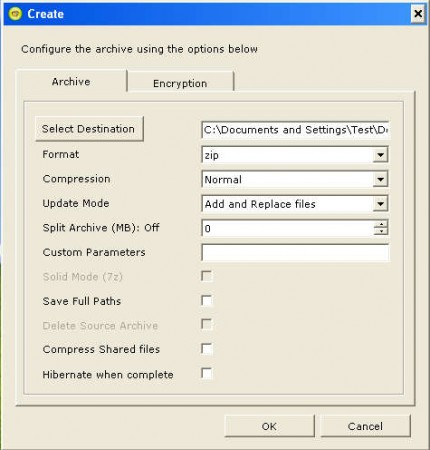
On the image above you can see the create window that pops up when you right click on a file and select Add to Archive option in the Bitser context menu, the right click menu. This is where you can select all the different options that are available with Bitser. Next to a very long list of supported data archives, another great thing about Bitser would be the fact that it also comes with a lot of options when it comes to both creating new archives and unpacking existing archives, some of the useful features that this free archiver has are:
- 20+ supported archives for extraction (ZIP, RAR, 7Z, TAR, UDF, ISO, DEB etc)
- Create either ZIP, 7- ZIP or EXE/SFX self extracting archive
- Right click context menus
- Add encryption on archives, password protection
- Choose the compression strength
- Split archives after a certain size
- Option for hibernation once that the compression is completed
Many more useful tools and features hide behind the Bitser name, and now we’re gonna put the one that’s probably sparks the interests of majority of the readers, and that would be what kind of compression strength is offered with Bitser.
Similar software: Free software to extract RAR files, Bandizip, WinZip Alternative.
How to create data archive for free with Bitser
Creating archives is a great way of how you can easily group together various different files into one container, and also in the process decrease the size of the files, to compress the archive.

On the image above we can finally see the default interface of Bitser. Notice at the top that it has Beta in its name, that’s because the program is still in development, but despite of that this free archiver worked just fine for us, without any kind of problems. Click Create in the top left corner, find and select the files and folders that you’d like to add to the archive and then at the bottom of the application select what kind of format the created archive is gonna have, from the three that were previously mentioned.
Once you’re done setting everything up you can hit Create and the archive should be created, in the location where you’ve selected on the previous window. Compression rate was actually quite good, but we were compressing text, 40kb file was decreased to 7kb in size. With images we didn’t have that much luck, even with compression rate set to Ultra.
Conclusion
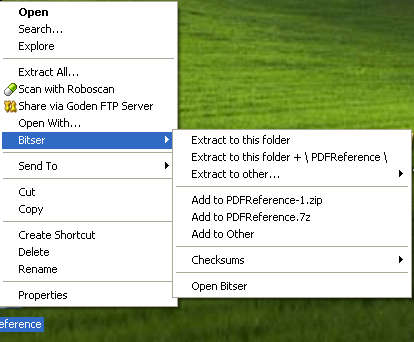
On the image above you can see the Bitser context menu, where you can quickly extract or create archives by simply right clicking on files and archives on your computer. Bitser is a free application, and it’s very lightweight on the computer resources, make sure that you give it a try, because it could save you a lot of headaches.
