Start Menu 7 is a free start menu customizing software which allows you to customize the start menu items based on the accessibility. There are numerous software products out there in the market, which allow the users to customize their desktop themes, start menu items, and the icons. One such utility software is Start Menu 7 to customize Windows start menu.
The major advantage of using this tool is that it allows the users to view the start menu items together in a group and even allows the whole computer to be viewed in a list under this start menu. Specially this utility functions well if the user who is using it tends to install more and more software with inclusion of the list in the start menu. Therefore, before installing this software keep it in mind that the software is meant only to customize start menu and nothing else.
You might not even like the way it displays start menu in the end. So the whole download and installation might be a waste. Do not think that just because the name suggests 7, the start menu will start looking like Windows 7 start menu automatically. If Windows theme services are disabled, the menu looks horrible.
Also, check out free start menu enhancement tool.
Key Features Of Start Menu 7:
- Menu items listed are alphabetically sorted.
- Modify, reorder or create items in Start Menu 7.
- Comes with a customizable power buttons panel.
- Any location on your system can be opened with a single click.
- Delay power management operations using Power timer feature.
How to install Start Menu 7:
- You can install this software directly from the website. It is a 16.5 MB executable setup file that you need to run after downloading. But keep in mind that the file needs to be unblocked from its properties if you are in Windows XP and from UAC control if you are in Vista or Windows 7.
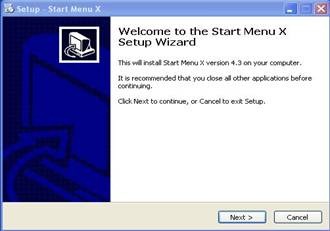
- You need to click on next, and then accept the license agreement to continue the installation.
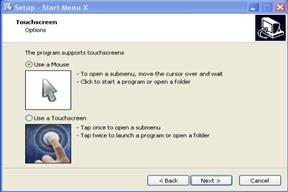
- Next, you need to choose whether you are using a mouse or a touch screen for use. Select properly or else you will face issues after installation.

- After installation Start menu 7 will start. Now hover over the start menu and click on it to see the changes.
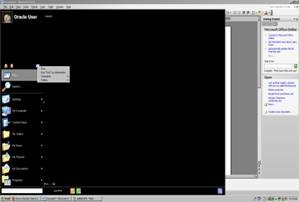
User interface and the disadvantages:
The user interface offered by Start Menu 7 is not at all attractive by looks. Though, the function has been well figured but it is not enough to make a sensible computer user by it. The software is available in two versions namely a demo full version, and a complete paid full version with two or three more features. Therefore, it is up to you to decide whether you need it or not.
You would also like to check out Windows 7 start button animator reviewed by us.
Summary:
Frankly speaking this tool did not impress me at all. It is just a modification of the start menu in order to bring in few more used items like Control Panel, My Computer and many more, directly under the Start Menu. It needs some resource, since it remains seated in the right hand corner of the screen.
The start menu really becomes clogged once more and more applications are loaded. Though, the popular start menu items like shut down and other power button are shown in Start Menu 7, but we all know that few of these items are required, but with few steps we can definitely customize the start menu in our own way and make this done without the Start Menu 7, if we are ready to know how to deceit. Thus, rather than Start Menu 7 we can go ahead with any start menu customizing software. Click here to download Start Menu 7.
