Dashlane is a complete personal information manager which comes with browser integration so that you can easily and securely enter online account information during shopping, website access or any other situation where your personal information has to be entered online.
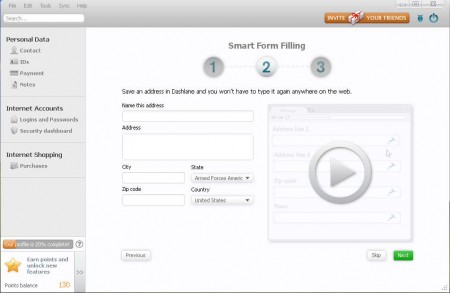
Image above is the default welcome screen that waits for you upon opening Dashlane. Before you get to the screen above, you will gonna have to give the application your email address and create a password for accessing it. This is necessary because you will be storing sensitive data inside the application. Your information will also be required, though not necessary, upon opening Dashlane completely, you can enter:
- Your full name and address
- Your credit card information
Don’t worry, you can skip this step and not give the application your credit card information, or any information about you for that matter. The reason why you will be asked this personal information is because of automatic form filling, which is one of the things that Dashlane can do.
Similar software: ID Vault, Safetica free.
Protect your online information with Dashlane
To start working with Dashlane, you’re first gonna have to load it up with your personal information. This might seem frightful at first, giving info that’s important to some unknown application. The thing is that Dashlane is not an unknown app, a lot of famous websites are recommending it, ours included, and you can rest assured that your data will be secure with Dashlane. Types of information that can be stored in Dashlane are:
- Contact information, emails, numbers
- ID Card info, passports, driver’s license, social security, tax
- Online payment – PayPal, credit card and bank account information
- Notes, protect sensitive text or any other type of information
- Browser logins, Firefox, Chrome, Internet Explorer supported
- Import passwords from 1Password, LastPass, Roboform, and others
Entering all this information is important, because once that it’s entered inside Dashlane it gets password protected and encrypted. Browsers are known to be vulnerable to password stealers, Dashlane allows you not to store any information inside your browser, save it and encrypt it all in Dashlane, here’s how it works.
First step is to add an account, for example PayPal:
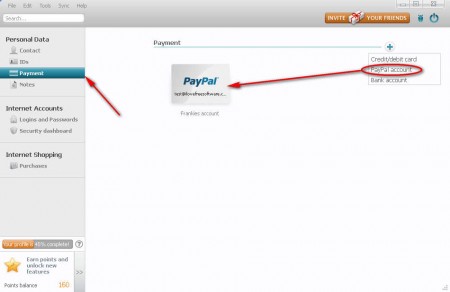
Open up the Payment portion of Dashlane where you can choose to store PayPal password by clicking on the blue plus sign in the upper right corner. After you do that a simple window will pop up where you actually enter you data, click save and the account will appear on the list. Now start your browser. The one which you’ve chosen to install Dashlane to, and let’s visit the PayPal website:
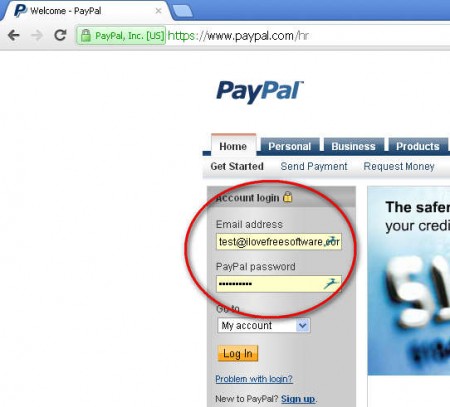
As you can see Dashlane will automatically fill out the login information with the one that you’ve entered inside Dashlane. Your password is safely protected from keyloggers because you only enter it once, not every time you need to access a website. Password stealers should be discouraged since the data is encrypted, not just password, everything else that you might need protected and encrypted can be protected and excerpted with the help of Dashlane, same thing that’s applied for PayPal goes for every other website, forms will be automatically filled, data protected. Try Dashlane, free download.
