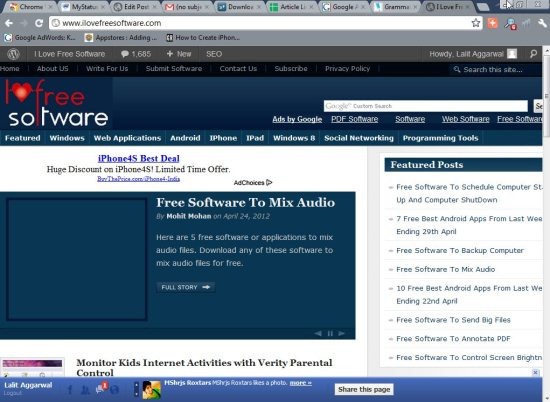
MyStatusBar is a free Google Chrome extension for Facebook. It adds Facebook status bar at the bottom of Google Chrome browser. The Blue colored Facebook status bar gives access to all your notifications, messages, and friend request. Also, the extension gives access to all the status updates of your Facebook friends. You can even jump to your Facebook start page from MyStatusBar directly.
Now you can easily browse you favorite sites and programs while keeping in touch with your Facebook friends. Thanks to extension developer who made Facebook browsing easier along with browsing to Favorite sites on Google Chrome browser.
One of the best part of this chrome extension is its one time login. You just need to login to your Facebook account for only once and then you can access your Facebook with one click on any website. I truly liked this way to access Facebook on any website. Now I won’t miss any Facebook status update and can check all the notifications instantly on my Google Chrome browser.
Remember: After the successful or complete installation of this smart chrome extension for Facebook, do close the tabs and Google chrome windows running on your PC. Open fresh Google Chrome window and then start browsing Facebook on any website with MyStatusBar extension for Facebook.
Also check out other Facebook Chrome extensions reviewed by us.
Features Of Chrome Extension For Facebook:
- Enables a smart Facebook status bar on Google Chrome browser.
- Access all your Facebook notifications, messages, and friend request on any website.
- The extension even allows you to receive real-time status updates and photo uploads by your friends.

- Jump to the start page of your Facebook whenever required.
- One time login required.
- Interface of the extension looks easy to manage on PC.
- Share the link directly from the status bar.

Take a look on Google Plus chrome extensions reviewed by us.
How To Use And Install MyStatusBar Extension:
How To Install:
- Visit MyStatusBar extension page to get the download link.
- Tap on add to chrome option to install the extension.
- After installing MyStatusBar on your Google Chrome browser, close all the tabs and all the Google Chrome windows running.
- You will now see a smart Facebook status bar enabled on your chrome browser.
How To Use:
- Login with your Facebook username and password.
- You can now access all your Facebook notifications, messages, friend request directly from MyStatusBar for Facebook.
- Tap on the start page button to jump to the start page of your Facebook account.
- You can even check out all the Facebook status updates by scrolling up and down.
If you are a Facebook junkie, install this Chrome extension for Facebook, as this will help you out in browsing Facebook while browsing other websites on Chrome. If you find any other interesting Chrome extension or Firefox plugin for Facebook, then lets us know in comments section.
You can now send large files through Gmail by using ForgetBox on your PC.
