Here are 5 free driver updater software to find and install device drivers.
All these software will automatically start the scanning to find out outdated or missing drivers. Most of these software can automatically download and install those drivers without spending a single penny. Some of them can also help to repair the corrupted drivers, if possible. With updated drivers, your PC will run smoothly, and perform better than before. From BIOS to HDD, flash drive to mouse & keyboard, card readers to webcam, etc., these software are handy to find suitable drivers. You must restart your PC after updating the drivers. Lets start the with the first free driver updater software listed here ‘DriveTheLife’.
Note: This article was completely updated on 27th Feb 2015.
DriveTheLife
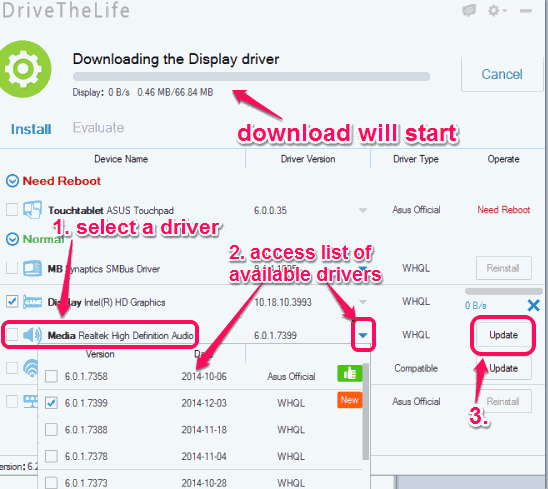
DriveTheLife is my personal favorite driver updater software in this list. When you will launch this software, it will automatically start the scanning, find any outdated, missing, or corrupt drivers, and install the suitable drivers. One more interesting thing about this software is that it can also provide you the list of official and WHQL tested drivers. From that list, you can choose any driver for the installation.
Apart from these interesting features, this software could be useful to repair any corrupted driver. Moreover, it also provides feature to automatically backup your drivers before it starts updating them. So even if updated driver causes any problem, you can easily restore drivers from the backup. All these features have made it an advanced driver updater software.
You can also check full review.
Driver Booster

Driver Booster is also a great driver updater software. It automatically detects outdated drivers and installs those drivers in a single-click. Option to install drivers one by one is also available. Unfortunately, option to back up drivers is not available. However, it can automatically create system restore point before updating the drivers to overcome from any problem.
Other important features available in this software are: add devices to ignored list to escape the scanning for drivers, view detailed information of a particular driver, view list of UpToDate drivers, etc.
Click here for full review.
DriverPack Solution
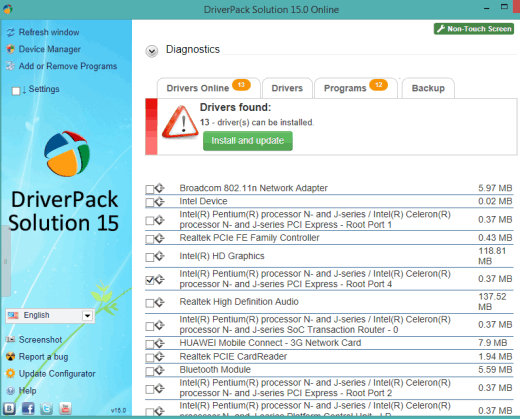
DriverPack Solution is another handy software in this list. When the automatic scan is completed by this software, it will show the list of drivers that can be installed. You can install and update all drivers together or can select the required drivers.
Apart from this main feature, it supports feature to update the installed software which is not possible with any other software in this list. So your device drivers as well installed software or programs will remain up to date using this software. Feature to backup the installed drivers and restore Windows, whenever needed, is also available. While running it for the very first time, it provides a wizard to easily understand this software. You can follow or skip that wizard.
Check full review.
Device Doctor
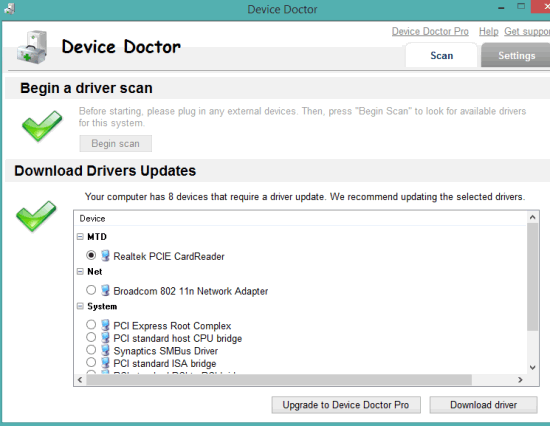
Device Doctor is also a good software to automatically scans your PC for outdated or missing drivers. However, it doesn’t let you automatically download and install the drivers from its interface. Instead of this, it opens a webpage, and let you download the zip file of the particular driver selected by you from the scanned results.
This software has feature to schedule scanning for a particular date and time which makes it different from other software available in this list. Moreover, you can also enable option to start scanning your PC for missing drivers in idle mode. There is no feature to create backup or system restore point using this software. So you need to manually create the restore point to handle any problem.
Read its full review.
DriverIdentifier
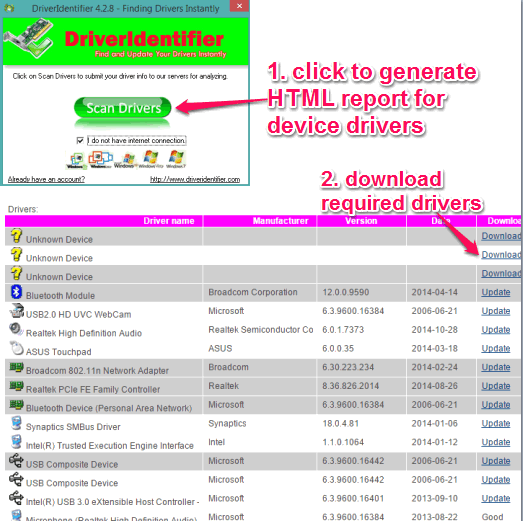
DriverIdentifier (for non-commercial and private use) is the last software in this list to download device drivers for free. However, process to get drivers is a bit long. It first scans your PC by sending the information to servers and generates an HTML report of all drivers. After this, you have to open that HTML file in a web browser to see the details of all drivers that needs update and can be downloaded. Finally, you have to create a free account (or login with Facebook or Google account) to download the zip archive of required driver. Although, it is time-consuming, but not a bad option to get the free solution of outdated or missing drivers.
For a particular device, a huge list of available drivers from different vendors is presented to you. You can download the driver of any vendor.
Conclusion:
These all software worked absolutely fine for me and I was able to easily find and update outdated or missing drivers. However, if I had to recommend only software from this list, my answer would have been ‘DriveTheLife’ software. Almost all the features are provided by this software to increase the life of your hardware devices.
