Here, are 5 free Stock Tracker apps and extensions for Google Chrome browser. We normally search stock quotes of different stock exchange markets on Google or any other search engine. Chrome web store has many Stocks Tracker apps and extensions.
Below, we will discuss about Stock Tracker extension, Stop Watch extension; one of the simple stock tracking chrome extension, Free Stock Charts; one of the popular one in Chrome web store, and more.
Stock Tracker:
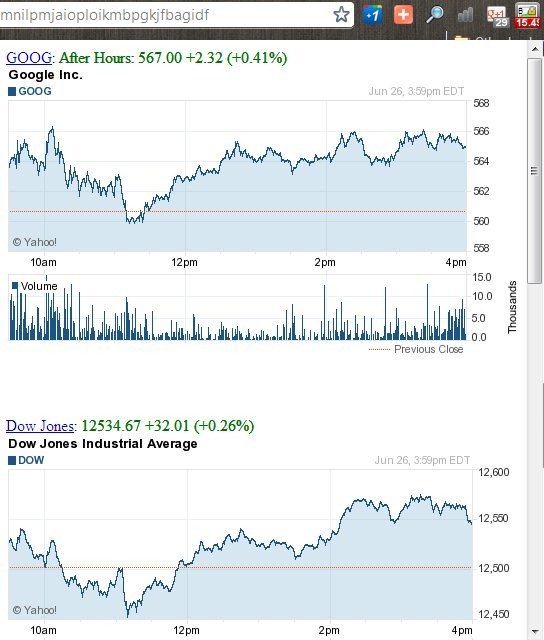
Stock Tracker is a free extension to track stock quotes on Google Chrome browser. This Stock Tracker extension tracks the stock quotes from Google Finance. The extension displays the stock quotes of the stocks which you register in the extension. Also, this Stock Tracker extension displays the stock price, change in price, and percentage change in price in the form of badge on Chrome browser. The extension displays the ticker symbols as they are registered in Google finance. Also, Stock Tracker extension allows you to set the price refresh delay. It provides real-time chart updates with perfect graphs based on price fluctuation of stocks. The extension also changes the ticker and displays the stock quotes according to the different tickers.
Stock Watch:
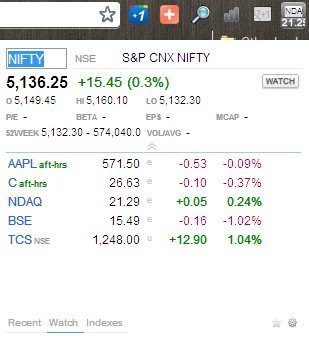
Stock Watch is a free Chrome extension to track stock quotes of different stock exchange on Google Chrome browser. This stock tracker extension is a simple extension which tracks stock quotes by searching them in search box. The extension has a small search box to type and search for different symbols. While searching symbols, the extension provides related suggestions of symbols. You can select any symbol from the list of suggestions and track the stock quotes of the symbol selected. You can even add the searched stocks to watch list. Watch list in the extension helps you to get real-time stock quote updates. You can even check index and recently searched stocks.
Stock Watch extension displays the stock value according to price change, current price, and percentage change. The default markets of the extension are U.S. Markets (NYSE, NASDAQ, AMEX). Head to Settings→Tools→Extensions→Stock Watch→Options to explore the settings of Stock Watch extension on your Google Chrome browser.
Free Stock Charts:

Stock Charts is a free stock tracking Chrome app to track Stock quotes on Google Chrome. Stock Charts is one of the popular stock tracking app in Chrome web store. This stock tracking app shows clear stock chart with the current stock quotes, its percentage and actual ups and down. You can add symbols to watch list and track stock quotes of different stock exchange. The app also shows the graphical presentation of ups and down of the stock selected from the watch list. Stock Charts app shows the real-time changes in the price of the stock market. You can even compare any one stock exchange market from watch list to any other stock exchange market. Moving scale of the app tells you the stock value at different time periods.
Global Index Watch – Stock Markets:

Global Index Watch is a free Chrome extension to watch stock index on Chrome browser. This stock tracking extension is an easy tool which provides up to date index quotes on your Google Chrome browser. This extension provides the list of selected stock exchange markets according to the countries selected. The extension tells you the index values, actual change, and percentage change in indexes of stock exchange markets. You can check the list of countries for which the extension allows you to check the stock quotes.
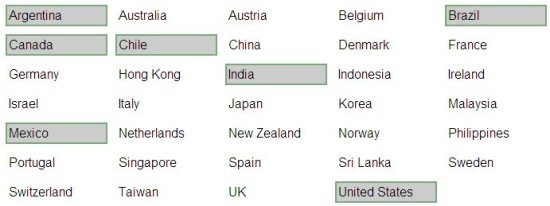
The only bad part of Global Index Watch is that, you can’t search for stocks of your choice.
Stocks:
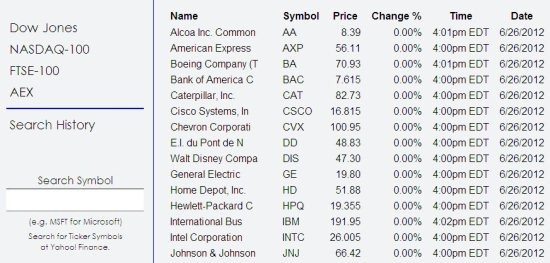
Stocks is a free Chrome app to track stock quotes on Chrome. This stock tracking app is a simple app with easy to use interface. On launching the app, you will see the list of stock exchange. You can check the name, symbol, price, percentage change, time and date of the stock exchange quote. Stocks app pulls the stock quotes from Yahoo finance. You can click on any stock exchange or symbol to check the full details on Yahoo finance online. The app even allows you to search for any stock and check the price of it and other details of it. The app allows you to search the stock by its symbol.
Remember: After searching the stock in the app, wait for 15 minutes to let the price and other details of the stock to update. If you want to check the price and other details of the stock, then click on the stock from the search results or the stock list. The app will divert you to Yahoo finance online. There you can check the current stock price in real-time.
If you love to play with Android, then check out Stock Tracking apps For Android. You can also take a look on Currency Converter extensions for Google Chrome.
