Language Immersion is a free Google Chrome extension to convert language of a webpage into multiple other languages. This Language Immersion extension turns your webpage language from English into your favorite language.
The extension offers you over 64 languages to convert the webpage language. Along with converting the webpage language, the extension even speaks up the converted text. Set an immersion level in the extension and you will find the converted words in the selected language of the webpage accessed.
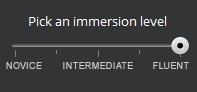
Remember that this Language Immersion extension converts only certain text and phrases from English into the language of your choice. I truly liked the extension, as you might meet with a situation where you want the webpage to be displayed in some other language on your Google Chrome browser.
Also, it becomes really hard to convert whole webpage; say for e.g., if you use Google Translate. For converting text in some other language with Google translate, you need to select the text, copy the selected text and then paste the copied text into Google Translate.
By installing this great Language Immersion chrome extension, just open the webpage and you will find the webpage already converted into the selected language of your choice.
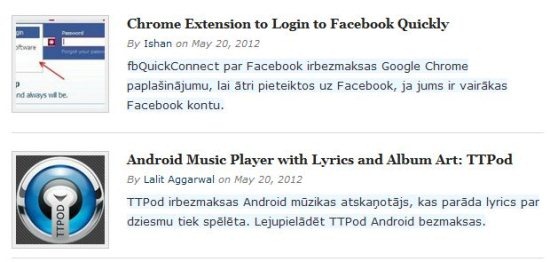
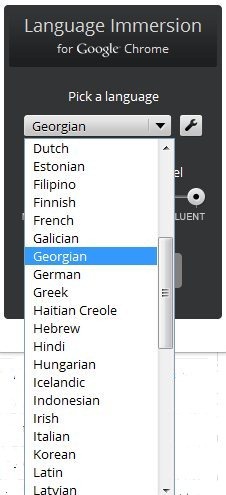
The only sad part of this Language Immersion chrome extension is its limited language selection. You can only convert the webpage from the list of the languages given in the extension. But then 64 languages is good number in the extension.
Key Features Of Language Immersion For Google Chrome:
- Convert English language content from a webpage into multiple languages on your Chrome browser.
- The extension offers 64 languages to convert the content into.

- Simple and user-friendly extension to use.
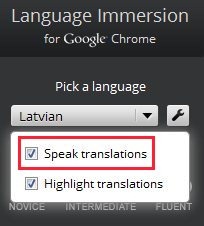
- Along with converting the language of the webpage, the extension also speaks up the converted text.

- Pick from 3 different immersion level i.e., Novice, intermediate, and fluent.
- Highlights the converted text on the webpage.
- Translate the converted language back to English.
Note: Language Immersion is just an experimental extension. The converted text by the extension won’t always be 100% accurate as this is not a language genius. You can see the webpage from a bit different perspective which looks pretty cool.
You can take a look at language translation extensions for Google Chrome.
How To Use Language Immersion Extension:
- Install the extension from web store on your Google Chrome browser.

- Tap on “On” button to enable the extension.
- Select the language from the drop down list.
- Select the immersion level and you are done.
- You will find the text or content of the webpage converted into the selected language of your choice. Click on any text on the webpage to convert the selected text back into English language. Also roll-over the translated text or word to make the extension speak the word.

Install Language Immersion Extension On Your Google Chrome Browser:
Search for “Language Immersion For Chrome” in chrome web store. You can also click here to install the extension. Follow further instructions and the extension will be installed on your Google Chrome browser.

Opt for this Language Immersion and see your webpages in a different language. Make your webpages readable by converting them in different language for different persons reading it. If you know any other chrome extension which works perfectly by converting the content accurately, then do let us know in comments below.
