ActiveExperts SendEmail is a simple email messaging software that you can use instead of the large and bulky email clients like Microsoft Outlook, when you need to send a message to someone. Name of this email messaging application tells us that it is only for sending messages, it’s not a full fledged email client which would also support receiving emails, but even without that option, SendEmail has a lot to offer to those who try it.
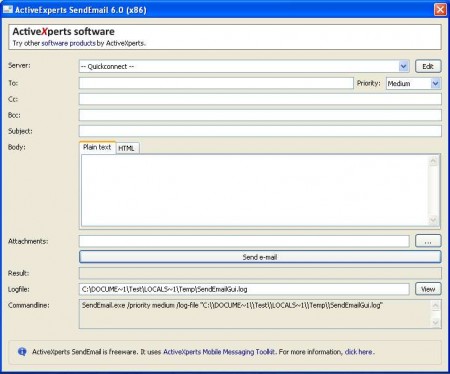
Like you can see, the interface of the program is not packed with a lot of options, and best of all there is no installation, which makes this a portable email messaging software. Opening up more serious email suits like Thunderbird and Outlook could take time, especially if you have a lot of accounts setup and if you receive a lot of messages. In these types of situations, you might have thought how good of an idea would be to have an email client for sending messages only, when you want to contact someone, SendEmail can do that for you, completely free.
Similar software: GroupMail, Free Email Clients for Windows.
Setting up SendMail e-mail sender
Before you can start using this partial email client you’re gonna have to setup the email client which you’re interested in using while sending messages. To do this you’re gonna have to click on the Edit button next to the Quickconnect field after which you should see something like this:
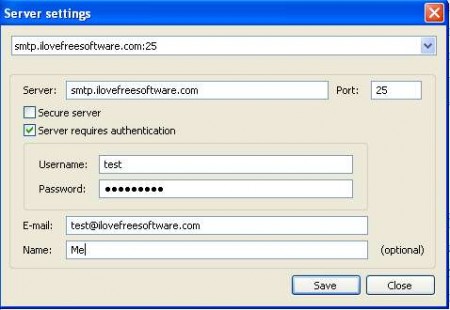
This is an important step and make sure that you don’t do any mistakes while filling out the fields. If you make a mistake, you’ll get errors when you try to send messages. Supported protocols for the outgoing email server would be SMTP and of course IMAPI. After you’ve entered all the settings, click on Save and then you’ll be returned to the main window.
Sending emails with ActiveExperts SendEmail
Upon opening the main window which you can see above, you can see all the different options that can help you out when sending messages. Some of the of the more interesting features would be:
- Support for attachments
- HTML and plain text editors
- Ability to set the email priority
- Send to more recipients at once
Quite a lot of options for an email program which is only a few megabytes in size, and doesn’t require any kind of installation. After you’ve written your message and set everything up:
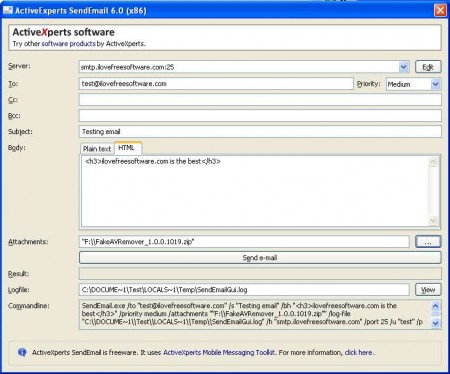
Hit Send e-mail and your message will be sent. If you plan on sending a lot of messages, remember that Gmail doesn’t allow for unlimited amounts of emails to be sent per day, so that you don’t over do it, seeing how easy it is to send :).
Conclusion
One main advantage of this small email utility we’ve already mentioned, that there’s no need for installation and that you will not have to spend a lot of computer resources running it. Functionality had to be sacrificed a bit in order for this to happen, but if you are not a very demanding user, then sending emails with the help of ActiveExperts SendEmail is more than enough.
