Here are 5 free online task managers that let you manage tasks online. Such task manager can be used to create a simple online to-do list, or to manage individual tasks related to a project. All these online task managers are completely free, and easy to use.
Producteev

Update (1st Sept, 2018): This website is discontinued. You may try other websites covered on this list.
Producteev is freeware task manager that manages your task and to-do list. This free to-do manager is easy to access and saves you from missing any appointments and dates. Many applications sends your email reminders and other forms of reminders which you may miss. Nevertheless, with Producteev, you will be able to manage your tasks from wherever you are comfortable working: E-mail, IM, Web, iPhone, Gmail, Google Calendar.
The application uniquely lets you add tasks, deadlines, files to this freeware from your email, IM and other web tools, while you can direct the software to alert you about the tasks and dates. Interestingly, you can choose you own way of receiving alerts. Thus, you will not miss alerts and reminders, which eventually are buried, in your email inbox or you just missed to check your mails.
The freeware allows you to choose your alert types and the notification you want to receive for the particular tasks and dates. You can decide accordingly as to which events you want to be notified about and receive the notifications in real-time.
Some of the application features are:
- It manages all the tasks for you. The freeware is designed to manage Tasks Calendar, files attachment, delegation, deadlines, notes and much more.
- Keep an overview on the projects and related jobs. Get timely alerts and reports from the application and keep a check on the project status.
- The application customized filters that you can use for filtering the tasks which is delegated to your particular subordinates or the task that you scheduled last week.
- Assign tasks or add your colleagues to your application workspace.
- The application also offers Google gadgets, which you can collaborate with your Gmail account for better accessibility.
Read more about Producteev, or try free here.
Plancake
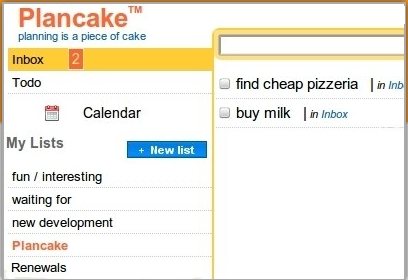
Plancake is free task manager application that easily plans and organizes your tasks and to-do list for you. This effective list manager is very easy to handle and simple to use. Control your activities and prioritize your work with this simple tool. You just cannot afford to forget your important appointments, dates, meetings, and tasks in your professional life and personal life. This freeware was designed keeping mind, the importance of the dates and tasks in your life, and will help you keep you abreast and you can remember everything with this application.
The application helps you to control your project components and manage them effectively. When you want things done at time and in schedule, you can rely on this application since it will organize all the tasks at one place for you. Get your dates, ideas and meetings organized with this free tool. For using this freeware, you need not download anything. Simply register yourself with the app and you can use this freeware for free online.
The application organizes your tasks and dates by using your email inbox. You can send an email to the app using your username with the app and add the task to the subject body. Plancake creates email address for all users registered with the app. However, this address is not very easy to remember, but you can save the app in your account.
You can send emails to your Plancake email address. Add your task to the subject line of the email and the body of the email can be used as a note to be attached. However, if you don have any notes to attach you can leave the email body as blank. If you are on the away from your Plancake, you can just send an email having the task you want to remember as subject. Then, when you log in into your Plancake account, you will be able to organize that task.
Read more about Plancake, or try free here.
Toodledo
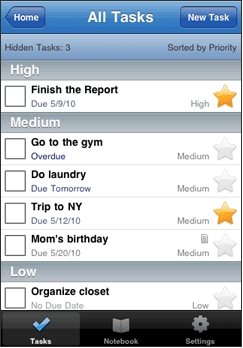
Toodledo is free application that effectively manages your tasks and helps you to prioritize them for your schedules and projects. The application helps you to organize your task in the folders and sub folders that you can label accordingly. The folder system arrangement will simplify your retrieval and allow you to search and sort through your tasks. Toodledo is also available as an iPhone app (screenshot above is of the iPhone version of Toodledo).
The application is designed to manage your to-do list and increase your productivity with single application managing all your important tasks and dates. Set the tasks in the folders for easy recognition of the task nature and assign them due date and priority ranking according to the urgency it follows. There is a sort able online to-do list will help you remember to complete tasks on-time.
The application is known for its portability. The freeware can be carried wherever you go. The application is light weight and can be carried in your cell phone or can be accessed online along with your email accounts. You can also integrate it directly with your web browser to contact your free to do manager. The application is designed to analyze dates, priorities, time estimates, and other characteristics to create a customized schedule of the best use of your time.
The application is completely customizable and you can alter the task manager as per your preference. It is very easy to tailor-made your task manager using this app. You can easily hide any fields that you do not use. This way you can just view the details that are relevant to you. You can also set your time zone and date format, or define how you want to view your tasks. You can also set which types of items appear on your hotlist.
Some of the key features of this free online task manager are:
- It improve your productivity
- Is can be customized
- You can import tasks from many sources, including your Palm OS PDA, Microsoft Outlook, Apple’s iCal, and other online to-do lists.
- It is portable
- It has effective and efficient collaboration tools that allow you to set exactly who has the ability to read, add, and edit your tasks.
Read more about ToodleDo, or try free here.
Teamly
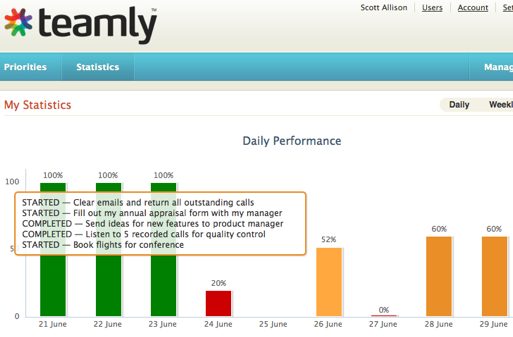
Teamly is free task manager for all those users who want efficient tools to manage your daily tasks and important schedules. The app is will manage your tasks efficiently. Since we know that we have number of task and items in the to-do list is never-ending. For this reason, this freeware is designed to let you choose your five most important tasks that you need to complete and focus on your daily activities.
The software is free for one user. If you wish to use this free application than simply sign up for an account in the web site and the application will generate you your own URL with the web site. Easily prioritize your activities and manage them quickly with this app. The app gives you freedom to add, edit or delete the tasks that requires amendments accordingly. Keep track of your tasks that you have accomplished and the items that are next in your list.
The priority page in the application interface will let you add tasks in the app along with the priority assigned by you. Just enter the tasks that requires to be finished and add the priority within which the task should be completed. The application interface is very simple and clear to understand. Your tasks will be added to the list in below classified accordingly to the priority. You can manage your tasks in the list like reorder them, mark them as abandoned, new, started, completed or carry forward to next period.
There is an in built report generating program code that generates and print reports for you. The reports can be used for your team as whole or just for your particular team member. You can assess your team performance, keep look to their activity history in details, and plan for their performance appraisals easily.
Read more about Teamly, or try free here.
Reverb
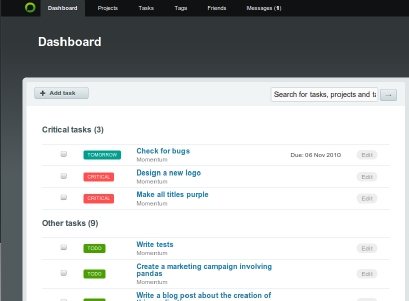
Reverb is free and easy to use application online that manages your tasks and to do lists. Control your tasks and accomplish your commitments on time with this free tool. Set priorities, tags and due dates, know what is coming up, and what you need to do next. The dashboard of the application will show you the task that requires immediate attention while other tasks with the manager will be lasted later. The tasks marked with red are critical requires attention from you.
Reverb was earlier known as just Verb. You can also use this free web tool to manage your important project files in its database. Upload your vital files with the application, use the application for data storage, and back up solution. Add as many files as you want and share them with your colleagues. Reverb has made it very easy for you to share your project details with your colleagues and associates. Share with them the details of the project progress and the tasks that being looked upon or completed.
With one central place for all your tasks, it becomes very easy to manage multiple clients and to work with multiple teams. Also, keep track of the active projects and ongoing tasks. It is very important that all your project phases are completed timely without considerable delays, so that you can complete your projects well in time and earn goof reputation for your business. View and schedule activities for your team and for yourself with this intuitive tool.
Read more about Reverb, or try free here.
Also check out Chrome to do list extensions.
