Click.to is a free online app that allows you to highlight some text in a web page, thereafter press “Ctrl + C”. This action takes you to look the selected text up on an attached pop-up consists of services such as Wikipedia, Google, YouTube and also you can post the text on Facebook, Twitter, send through an email and much more.
Let me explain with the help of an example- If you are reading an online novel and you come across a word with which you are not familiar, just select the word and “Ctrl+C”, you will find various options such as Wikipedia, Google and so on, click on Wikipedia Logo. It will directly take you to the Wikipedia page, where you will find the meaning of the selected word. It saves your time of opening up a search engine and then writing the text in order to search, share or send mail. You can directly search or play around with the texts using other tools as well. These tools are simultaneously called “Satellite Display”. At the offline part, Click.to allows you to create a new Word document with the selected text. Below is a sample image for better understanding:
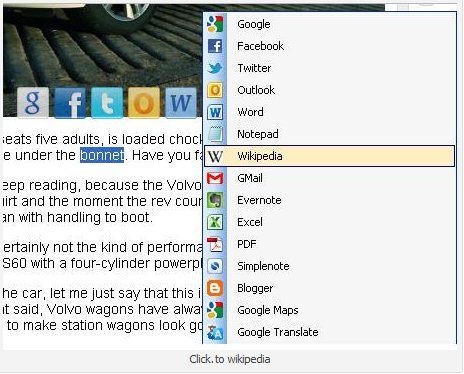
Apart from the text part, the service allows you to share screen-shots with your Facebook friends or Flickr list just by selecting the photos and pressing Ctrl +C. For example – if you are reading a story using e-book and you come across a quote which you find very inspiring. You decide to post the quote as your Facebook status, all you need to do is- select the quote and Ctrl+C. Click on Facebook logo which is available in “Satellite Display” and its done. To be precise, Click.to saves the time by eliminating “copy and paste”.
In addition, you can also look for a technical text or word on Wikipedia or various other search engines. You can take a look at the “Satellite Display” below:

However, in order to get access to Click.to, you need to download it.
Here is how to download Click.to:
- Go onto the website.
- Click on “
 “
“ - The download will start automatically
- On the dialogue box, click on “Save”
- After completing the downloading process , you can begin the installation.

In order to get started with Click.to, you need to click onto the shortcut of Click.to available on your desktop. This will take the icon to the system tray and the app is active now. Now, by clicking the icon, you can adjust various available settings.
If you are looking for search engine apps, then you can check out search engine apps for iPad, image search engines or jumper for specialized searches reviewed by us.
Here is how to use Click.to:
- Select the text that you want to search for, in a search engine
- Click Ctrl+C
- Choose one of the options available in Satellite Display
That’s it, you will be directly taken to the page of respective chosen option. However, if you do not find your desired option in Satellite Display, you can add even more.
Here is how to add more services in Click.to:
- Right click the Click.to icon
- Click on “Option”
- You will find huge number of other online services, select the one you need
- Click on “Add” and then “Ok”
Click.to is extremely advantageous app that saves loads of time by eliminating the “Copy and Paste” action. So go ahead and get it right away.
