Full Screen Caller ID Lite is a free Android app that displays a full screen caller ID on Android device. This Android caller ID app allows your Android to display your incoming or outgoing calls, SMS and Emails in full screen mode on your Android screen. It looks awesome, when you see incoming and outgoing calls displayed in full screen on Android. You can even view the missed calls in full screen mode on Android with this full screen caller ID app.
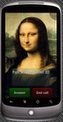
This Android caller ID app provides multiple options to customize the full screen caller ID on Android. The app allows you to display the messages and emails in full screen mode, which looks live, when received on your Android. You can set a caller ID image on each contact in your contact list. This will allow your phone to display the image selected on each contact in full screen, on the background of Android call ID. The same image will be displayed, when you receive an SMS or Email on your phone. The app contains a default background, which is displayed on all those contacts on which you have not selected any specific image.

You can also check out fake caller app for Android reviewed by us.
Some Key Features Of Full Screen Caller ID Lite App:
-
Displays a full screen caller ID on Android screen.
-
Displays clear buttons to answer and ignore the calls.
-
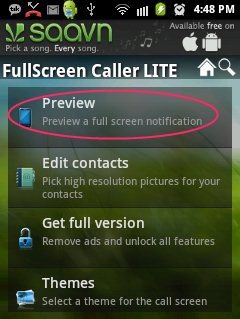
The app allows you to preview the Android call ID before enabling/disabling the full screen mode for calls, SMS and emails.
-
Edit contacts from within the app. You can select images from within the app for each contact in your contact list.
-
Sync Facebook pictures from within the app.
-
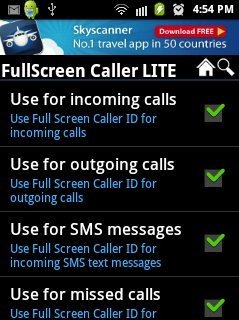
Enable/Disable full screen mode for incoming calls and outgoing calls.
-
Enable/Disable full screen mode for SMS.
-
Enable/Disable full screen mode for missed calls.
-
Enable/Disable full screen mode for incoming mails.
-
You can show/hide the phone numbers of callers.
-
You can also hide SMS text on the main screen when any message is received.
-
The interface provided by the app is awesome, and all the options are easy to understand.
Also, check out Fake-Text SMS Faker app to receive and send fake SMS on Android reviewed by us.
How To Install Full Screen Caller ID Lite App On Android:
-
Scan the QR code below or login to Android Market.

-
In case, you don’t have a Barcode Scanner, then tap on search to search for Full Screen Caller ID Lite app in Android Market.
-
Install the app from Android Market or by scanning the QR code.
The free Full Screen Caller ID app will be automatically installed. Click here to download Full Screen Caller ID app from Android Market. Enjoy Android caller ID in a very new look with this app. Feel live, when you receive any call, SMS or any email by viewing everything in full screen mode on your Android.
