Media Preview is a free video editor designed to add support for previewing some of the most widely used video file formats whose previews are not supported by both Windows and third party software. The program supports three languages, English, Chinese and French, and is available in both 64 and 32 bit versions.
Features
Media Preview adds crucial support for many file formats previews which are not available on Windows systems. Though Windows relies on third party software to extend support for many file formats, none of them takes care of the preview feature.
Default Thumbnail extractor often ends up capturing blank frames. The Thumbnail extractor on Media Preview detects the presence on images on frames and captures relevant content from the video.
The video editor is able to generate unique thumbnails for video files with similar starting frames. If it detects the presence of similar frames, the program searches for different frames and uses them as previews for video files.
Rename or manipulate your video files when playing them without any restrictions from Windows.
Support for both 64 and 32 bit systems.
How to use video editor
Installation went on smoothly. Media Preview is a simple video editor with no real user interface. You get a simple configuration wizard that controls what functions the program performs.
The media configuration wizard opens the associations tab. The tab allows you to choose file formats you want associated with Media Preview. You can save yourself the trouble of selecting all file formats individually and use the Select All button to select all of them at once or uncheck them all at once by clicking Select None. File formats checked will be previewed with the help of Media Preview. You can also add your own file formats by entering the extension in the User Defined Formats textbox and click Add. Get rid of user defined formats by clicking Remove. Click Apply to save configuration settings.
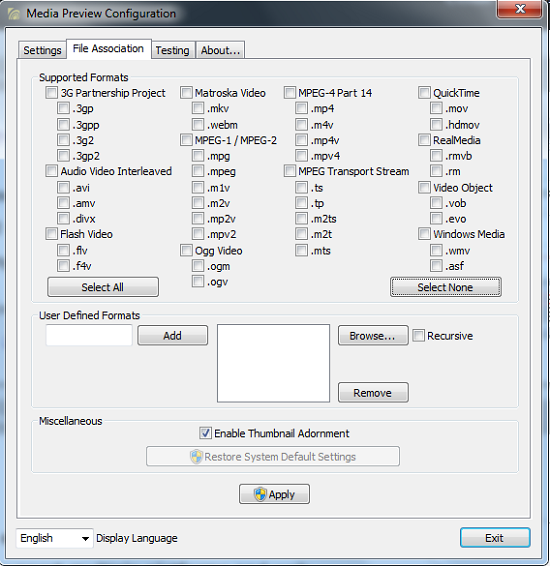
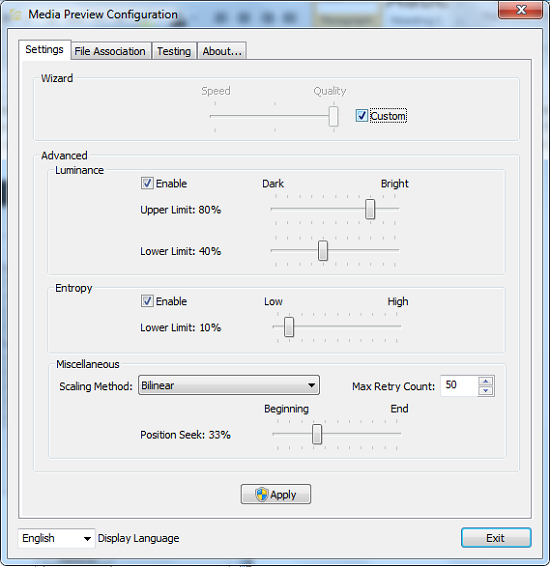
You can choose between three available languages from the Display language dropdown. You can edit thumbnail settings on the Settings tab. To edit settings, check the Custom checkbox to enable or disable settings. You can clear the system thumbnail cache from the Testing tab.
Pros
- Fast batch file format selection.
- Simple and easy to use.
- Preview almost all video file formats.
Cons
None that I could find.
Conclusion
Media Preview is an interesting and handy video editor for generating unique video file thumbnails for all known video formats.
