Dj Genius is a simple light weight media player. With Dj Genius you can play most of your favourite audio and video formats, listen to online radio and stream online TV shows.
Installation of this free media player
The installation was quite uneventful. While the installer took sometime before indicating any progress, it had none of the adware that plagues free software. The installer also required a running installation of .NET framework and recommended an update of the existing installation.
Features of this free media player
The main feature of the program is the media player. Dj Genius is capable of playing both media in mp3 and mp4 formats but I have to point out the range of formats it could play was greatly limited. It relied on third party software, K-Lite Codec pack in particular to extend its range of supported file formats.
The recording feature on Dj Genius allows users to record and edit audio in both ID3v1 and ID3v2 formats. This features allows for editing of crucial track information.
The audio library allows you to add mp3 files for playing. The audio library requires you to select audio files you want added instead of the software automatically searching and adding media from preselected folders.
On the plus side, Dj Genius had an inbuilt social network hub which for some reasons assumed I was on Twitter- which I was not. I was not able to get the hub on my Facebook page. The social network hub was bundled with a Dj Store which directed users to Amazon’s website which you can change on the settings module.
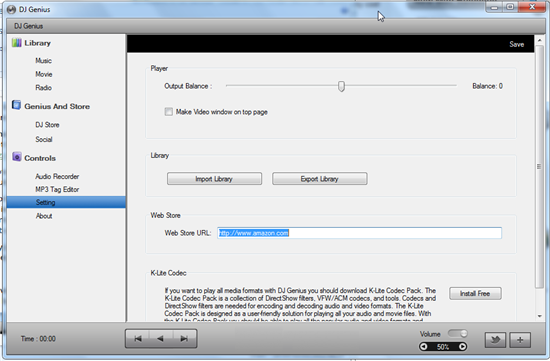
The radio module which allows online radio listening was easier to use and allowed me to easily add custom online radio frequencies. The module provided quite a variety of radio stations and all played with no problems.
Dj Genius however lacked some of the most basic features of a basic media player. For one it did not support drag and drop which I found very inconvenient. Secondly I could not get it to play a single file without adding it to the media library. It also lacked critical player controls like the repeat and shuffle functions for the playlist. I was stuck to playing my playlist in a sequence which was not very desirable. The equalizer and visualizations were not present either.
Light weight players are very popular and Dj Genius is one of those. However, its performance left very little to be desired. It actually went unresponsive after I added about 4000 files to the library.
How to use it
The user interface although very simple was not very well organised. Instead of the typical menu at the top of the application, you get a status bar which indicates the name and bitrate of the current playing file. Audio files can be added from the plus sign at the bottom of the interface- this could have been placed at the top of the interface. The interface is divided into three section, the toolbar on the right, track information at the top middle and audio library files at the bottom middle. Media player controls are at the bottom of the interface. They dared to be different on the volume control which I doubt did the player any justice. The twitter button to the left of the add button opens the twitter page on the player.
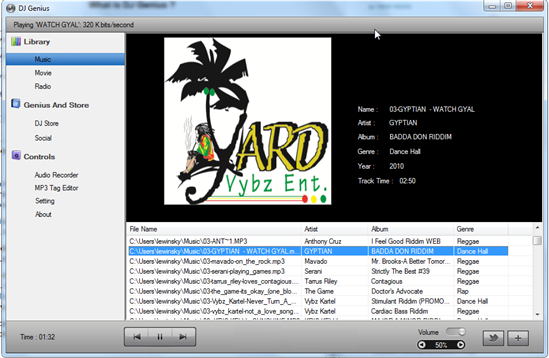
The radio module can be accessed by clicking the radio button. First time use requires to load channels by clicking the large icon at the centre of the interface. New channels can be added by clicking on its respective button at the left corner of the radio interface. The audio recorder can record by clicking on the large microphone icon which appears after clicking the Audio Recorder button. The mp3 tag editor can be accessed by clicking its respective button and requires that you select a file you want to edit.
Conclusion
Dj Genius is definitely not the best player around and could do with a little more work.
