Rightload is a free file upload software that lets you upload images and files from your folders directly to FTP servers. The program adds an option to the Windows right-click menu and allows the operator to upload files directly to an FTP/SFTP server as well as pre-determined HTTP upload servers.This makes it a much easier to use file upload software, as compared to other free FTP clients.
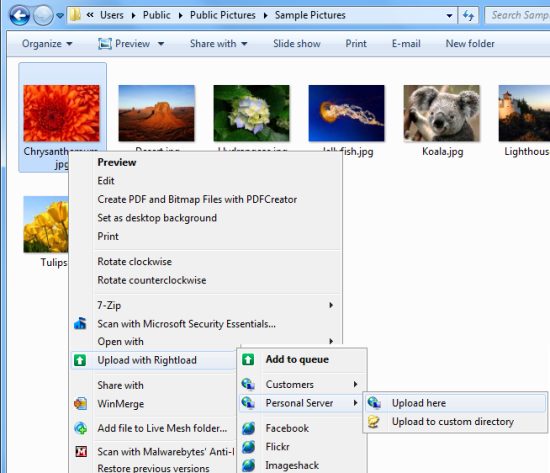
The Rightload free program is continually updated to give users the most recent and advanced options. Some of these options include:
- The automatic resizing of images. This in turn maximizes the image’s dimensions.
- Add a server or another folder to the ‘send to’ menu. This makes it easier for the user to select the destination of the file.
- Uploading support for adding images to Facebook, Flickr, TinyPic and ImageShack. Using Rightload ensures your photos can be added to the above sites with ease by just right clicking on photos, and choosing the site you want to upload the photos to.
- Users are able to add plug-ins which allows uploading to any website of their choice, rather than only the default three of Facebook, Flickr and ImageShack. Plug-ins can be easily downloaded from the ‘download’ page. It is important, however, to check each plug-in during installation.
The above are just a few options that this free file upload software offers. Other good FTP tools that we reviewed earlier allow you to mount FTP location as Windows drive, and Skydrive client.
Free Rightload is, for those who have never used it, user-friendly. Simply select the image you wish to upload, right-click, select ‘upload with Rightload’ from the menu, and choose which service from the list. The Rightload window will open and you will see the files queued waiting to be uploaded. Once the user has logged onto the destination page and received authorization for Rightload to connect with that server the queued files would begin to upload.
Rightload is the perfect free tool for those that are not confident uploading images using complicated methods – the program basically allows you to sit back and relax while files upload.
When all files selected have been uploaded, the user can see the images in his or her account instantly. The free tool Rightload is compatible with Windows XP, Vista and Windows 7.
