• Home
  • Software Testing Service
  • About US
    • Privacy Policy
    • Disclosure
  • Write For Us
  • Submit Software
  • Contact Us
    • Subscribe
I Love Free Software
Best free software available all over the web. The free software categories include Windows Software, Social Networking Tools, and software installation videos.


  • Featured
  • Windows
  • Web Applications
  • App Store
  • Android
  • iPhone
  • iPad
  • Windows 8
  • Social Networking
  • Programming Tools

Video Editing Software: Free Video Dub

By Arvind Kumar on February 28, 2012 | Sponsored Links

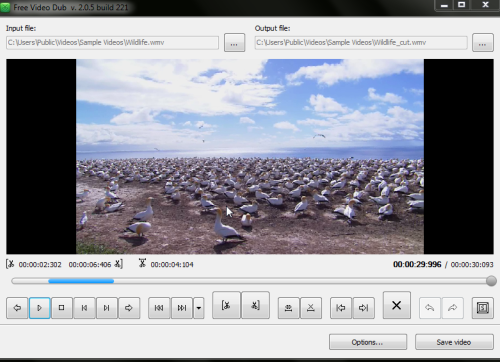
Free Video Dub is a free software for video editing. Using this software you can delete or cut parts of video from any video files. This free video editing software lets you delete parts of video file without re-encoding. It also maintains the quality of video after deleting unwanted parts of video file. This free video editing software supports multiple input video formats like *.avi, *. mp4, *.3gp, *.flv, *.wmv, *.mpg, *.mkv and many more. Free video Dub is safe and easy to install.
free video dub
Sponsored Links

This free video editing software saves the edited video to new file. You can easily remove uncensored video parts from your video file.

How To Use This Video Editing Software:

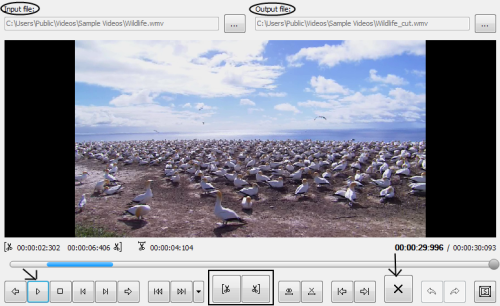
  • You have to input a video file from the listed formats.
  • Then you have to play video file.free video dub 2
  • Set a start and endpoint to crop the unwanted part of a video file.
  • Click on delete to remove unwanted part of a video file.
  • Now press the save button to save the video.
Key Features Of Free Video Dub:

  • Easy to access and run this free video editing software.
  • Supports multiple file formats.
  • Edited video is saved as a new file.free video dub 3
  • You can set for computer turn off after completing your video editing.
  • You can choose multiple languages.
  • Set checks for updates.
  • You can also see multiple short keys to access this video editing software.

How To Install Free Video Dub To Your PC:

  • To install free video dub to your PC, click here.
  • Now, click on download
  • Double click on the setup downloaded.
  • Follow further instructions to install free video dub to your PC.

Free Video Dub is a free video editing software which lets you cut unwanted parts from a video file. Try out Free Video Dub software and rate its efficiency according to the work it does.

Home Page: Click Here
Works With: Windows XP, Vista and 7
Free / Paid: Free

Link to This Page:


You Might Also Like:

  1. Audio Editing With Free Audio Dub
  2. SolveigMM AVI Trimmer + MKV: Free Software for Editing Videos
  3. AVS Video Editor: Free Video Editing Software
  4. LightWorks: Free Professional Movie Editing Software
  5. AoA Video Joiner: Free Software to Join Multiple Videos

Be the first to know about Latest Free Software:

  • Join us on Facebook
  • Subscribe to our RSS Feed
  • Follow us on Twitter
  • Subscribe to Email Updates:

Posted in Video Software | Tagged free video editing | Leave a response

Arvind Kumar

« Previous Next »

Featured Posts

  • Top 7 Free Launchers for Android
  • 5 Free Snippet Managers To Manage Code Snippets
  • 5 Free Online Tools To Test Website In Different Resolutions
  • 5 Free Microsoft Access Alternatives
  • 5 Free IP Notifier Apps
  • 5 Online Mapping Websites
  • 5 Free Alternatives To iGoogle
  • 7 Websites To Download Windows 8 Themes

Join More than 15,000 Followers!

Enter your Email Address
  • Submit Software
  • Software Testing Service
  • Write For Us
  • About Us
  • Privacy Policy
  • Disclosure
  • Contact Us

Link to Us:

Did we review your software here? Feel free to flaunt this badge on your website:

Free Software

Use this Code:

Copyright © 2013 I Love Free Software.

Powered by WordPress and Hybrid. New - H