Vocabulary Instiller is free memory enhancement tool you can use to quickly master a new language or effectively memorize new words. The program allows users to create a custom list of words which can range from simple words, answers to exam question to programming language keywords you wish to remind yourself. Depending on how much you remember, you can rate each word or question on a scale of A to F.
Features of this enhance memory tool
- Add your own custom words
- The program runs on tray and so you can continue to do your work without interruptions
- Ignore and allow grading any time you want
- Customize system parameters
- Easily switch between work, home and exam modes
How to use and enhance your Memory?
The program requires no installation. To run the program, unzip the contents of the downloaded zip file and open the executable. The program quickly launches to tray. The interface is quite simple but needs some work.
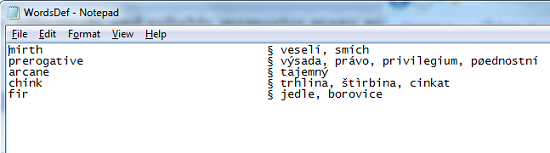
Before you can get started, you need to add custom words and their respective translations to the Word List. Right click on the tray icon to display a context menu and select Add word. Once, you have added a list of words, the program will then open a popup to remind you of a certain word. Durations between popups are mostly determined by the selected mode. Work mode considerably increases time between popups, while home lies somewhere in the middle between the latter and exam modes which open popups most frequently. Alternatively, you don’t have to wait for the popup timer to elapse, you can open a popup by double clicking in the tray icon and enhance your memory.
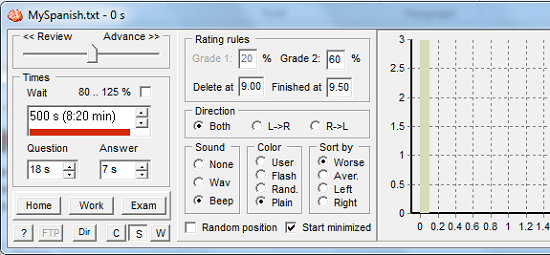
When the popup appears, you can grade how well you know the word or its translation by clicking the large rectangular bar or waiting for the timer to run and to reveal a grading system of buttons running from A to F. The grades are used to rate how well you can remember a word with F being the worst and A the best. Once, the timer elapses, the popup minimises to tray. You can cancel the popup using the Cancel button or exit the program using the Exit button. You can choose to completely ignore grading by moving the slider towards Review meaning that words to be displayed are chosen at random and none precedes the other or move the slider towards Advance to emphasize more on words with lower grades. You can view or listen to translations of English words you have written on the default Spanish dictionary website by clicking the www button.

Depending on how fast you can remember words or memorize them, you can change timer settings for both the question and answer by entering valid time values in the Question and Answer combo boxes. You can also set a timer for the popups to appear by entering a valid time in the Wait combo box. You can easily switch between the three modes by clicking on the respective buttons or by selecting them from the tray icon context menu. By default, popups appear in the bottom centre of the interface, you can change this by checking the Random position checkbox. You can toggle between a compact interface, settings and histogram window, and the wordlist by clicking on the C, S and W buttons respectively.
Pros
- Customizable popup timers, wordlist and even popup frequency
- View translation of languages you want to learn
- Simple and easy to use
Cons
- User support provided was not very comprehensive.
Conclusion
Vocabulary Instiller offers a set of features that would come in handy to anyone wanting to test their memory or even learn a new language conveniently.
