Web Timer is a free Chrome extension to record the time of web usage on Google Chrome browser. This Web Timer extension works nicely on Google Chrome browser.
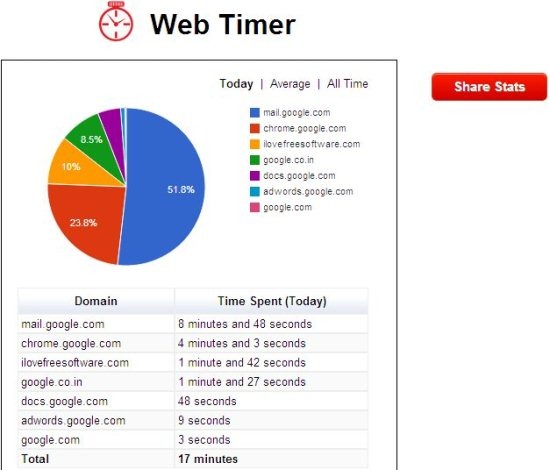
The extension is simple and easy to use. You just have to access web pages on different tabs and windows. Now, click on the Web Timer extension icon from the extension bar of Chrome browser. You will see the exact time you spent on each tab. The extension also displays a pie chart with the percentage of time spent on each tab. The percentage varies according to the time recorded by the extension on Google Chrome browser.
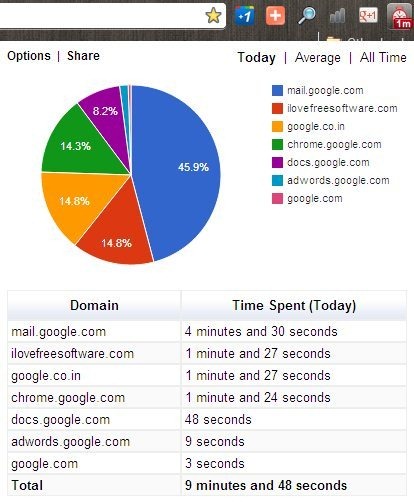
Along with time spent on each domain, the extension also calculates the total time spent and then shows the total time spent on all the domains. Web Timer is truly a useful extension for those who have the pressure to send the report of time spend on each website on daily basis. They can share the stats directly from the extension. To share the stats, just click on “share” button at the top of the extension window. Now, you will see the image of your Web Timer stats. Click on share button to get the link of the image from your Chrome browser. You can then easily copy the link of the image and share it.
You can also setup multiple timers to track time spent on multiple tasks.
What I Like About Web Timer Extension:
- Tells the exact time spent on each website or webpage accessed on each Chrome tab.
- Automatically starts.
- Displays the stats in exact time spent and calculates percentage according to the time spent.
- Share the stats by creating the image and link of the image.

- You can list some selected websites, if you want the extension to ignore the recording of time on those websites.
- Set the limit of number of websites to record in the list.
- View stats according for today, total average time, and all time.
- Pie chart is displayed with different colors so as to identify each website separately.
Also, check out KitchenTimer to create multiple kitchen timers.
What I Didn’t Like About The Extension:
Nothing!
Install Web Timer:
Click here to get the download link of Web Timer extension. Click on “Add To Chrome” button and install the extension on your Google Chrome browser. Now click on “Web Timer” extension button to launch the extension.
Web Timer extension is a useful extension to record the time spent on each website on a daily basis with ease. Create reports or stats and then share it with anyone on your Google Chrome browser.
