Teamly is one of the unique free to do manager that gives you free hands on to go beyond routine to-do list manager and focus on more important and high priority job. Mark your five priorities of the day, month, and year and keep track of them as which one you have accomplished and which is still on the list. The application was designed for the sole motive to let you focus on the most important jobs of yours.
As traditional to-do managers allows you to create long list of to do stuff, with which your priority items tend to get lost somewhere. However, using Teamly will avoid long list of task managers that never ends. Teamly encourages you to focus on just your top five priorities.
Teamly is for everyone, whether you are boss of the department or the staff. Every component of the office can effectively use Teamly. As this software targets on simplicity. Handling of the application is easy and very light. Just input your five priorities and do not miss them. Since you have a small list of tasks to handle with Teamly, it is sure that you are not going to forget your important appointments, dates, and task. The application is completely free for one user. Identify your important task and get it done on time and avoid long impractical to-do lists.
Teamly allows you to share your progress and plans with your colleagues. Sharing is very easy with Teamly, make quick share and you have the flexibility to choose as what you want to share. Share your progress card and let your manager know your status. You can also read MiniTask, P2Do, Evernote and ToDoTweet for managing your to do lists.
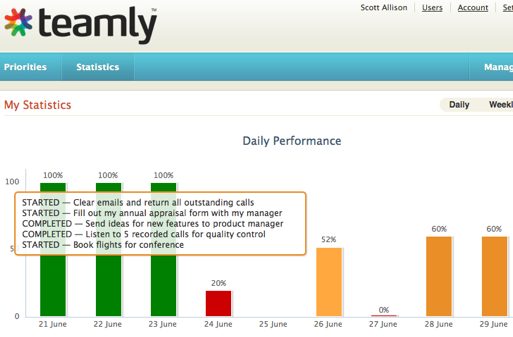
Stats track sheet is one of the most important features of Teamly. Since you need to keep track of your to-do status and your progress. Graphical representation is however always better than any text information. Teamly shows your progress in bar chart form, which is very easy to grasp and understand. Different bars use separate color forms denoting the status of the task. Green is for completed ones, red for added ones while orange is for in progress. This way you will determine the task that needs immediate attention and you can relieve about other things. You can also track the days when you were the most (or least) productive—and plan accordingly.
The application interface is very user-friendly. The priority page makes available for you glance view of the task and priority entered by you. Get an overview of the important task that are in the highest priority and which are newly added. Here, you can add, manage, and move your priorities around—or look back or forward in time to see what you have accomplished, or have coming up. Mark the priorities as abandoned, newly added, completed and in progress for quick decisions. You can see the priorities of specific date in this page.
