NoteFly is a simple free note taking application. The program allows users to create and edit notes on their desktop. It is available on both Ubuntu and Windows. For those who fancy a challenge, the source code is available for modification or compilation. An installation of .NET frame work is required for the application to run .The program is available in two languages, English and Dutch.
The download was quite small at a little over 200KB. Installation went on with no hitches.
Features of this note taking software:
NoteFly features include,
- Ability to produce very colourful notes in any colour you might think of.
- The note taking feature allows users to share notes via email, export them to a CSV file and even set them to appear on top of all other programs.
- Note formatting is supported. You can create a list using bullets, numbers, bold or underline any text you want to emphasize and add URLs in just a click.
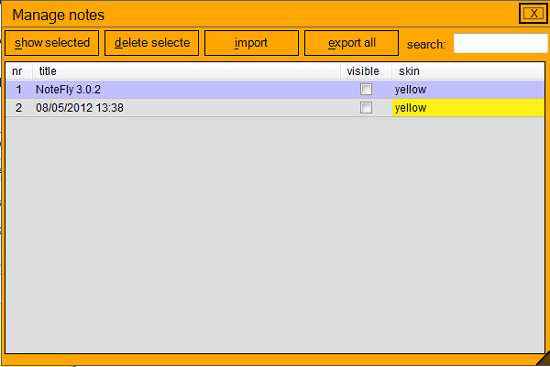
- The notes windows allows for easy manipulation of notes. Using this window, you can select which notes to be viewed, which to be hidden and which to be removed.
- To appeal to programmers the program has an interesting addition. It is able to detect HTML, PHP and SQL and highlight it using different colours.
- NoteFly is very customizable and functionality can be added via plugins. Currently available plugins include Skins Editor which can be used to create custom skins, SendToOpera which can send notes to Opera browsers and InsertSmiley which enables users to add smiley buttons to the note window for adding smileys to your notes.
How to use this note taking software:
The program when opened minimises to tray. From the tray icon, you can create a new note using the new note menu, view, hide or delete notes using the manage note menu and access program settings using the settings menu. As you would expect, the interface is very simple. It consist of a small note taking window with a title bar, a save button and a discard button at the top. The note taking is at the middle and editing tools are located at the bottom.
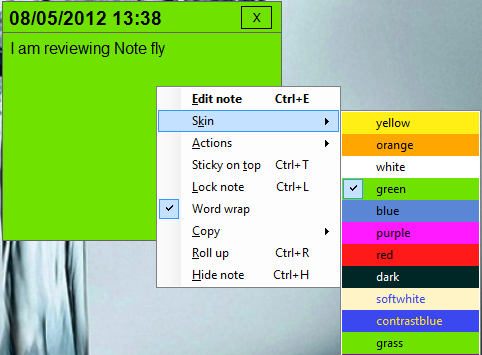
Note transparency can be increased and reduced on the Appearance tab in the settings menu. On the same menu you can set the default skin, font and size for all new notes. Notes can be added, managed and brought to front using three predetermined hot keys. Proxy and update settings are accessible via the Network tab. Available and installed plugins can be viewed on the plugin menu on the tray. Note options can be accessed by right clicking on the note.
Opinion
The idea behind sticky notes is not very new but we loved that it was implemented with a lot more features. Ability to extend via plugins and customize was a big plus.
Verdict
NoteFly implements an already existing concept but does it in a more unique and interesting way.
