Maryfi is the free Windows software which turns a Windows 7 laptop into a router, allowing the user to share the wireless internet connection. It is an application designed for all Wi-Fi enabled devices like laptops, smart phones, music players and gaming systems to connect to a computer that runs the Windows 7 operating system. Turning a laptop into a Wi-Fi hotspot was never so easy.
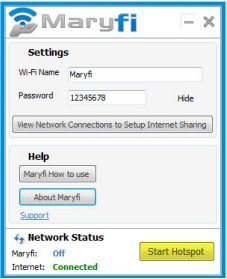
With Maryfi, the users can experience non-stop internet accessibility, regardless of the place there are in. Sharing the internet connection, cable modem, cellular card or even an other Wi-Fi network would has never been simple before. Maryfi is designed just for this purpose and the Windows 7 laptop can be turned into a Wireless access point effortlessly. Now almost everyone can turn laptop into a Wi-Fi hotspot.
You can download this software for free from Maryfi’s official website. The only prerequisite is that your device must run Windows 7. Apart from English, Arabic version of this software is also available.
You can also try Connectify or detect hotspot with We-Fi or Meraki WiFi Stumbler reviewed by us.
Some of the Remarkable Features of Maryfi are:
- The users find this software extremely easy to use. With just few clicks you can get connected to the network.
- You can easily share your network wirelessly. There is no need for extra devices like hardware, wire, plugs or chargers to connect.
- Besides being a router, this software will also act as a repeater. The large area of your home gets covered on broadening the range of availability of network. Thus, you can expand the network and use it anywhere in your home. Any device, other than the computer, can also be added to the network.
- Additionally, offline networking makes wireless sharing of folders and drives possible. The users can enjoy playing LAN games with the other users on the Local network.
- Other than your home, you can access the net from hotels, airport, shops, etc., No matter where you are, you can still get connected to the network.
- Also, cost charged by the providers for the usage of any other network can be greatly saved on using this software in all the places you go. For example the costly Airport WiFi can be done away with. The user can share the connection with his colleagues even on the move.
- Your network will be kept secured by password protected with the WPA2 Encryption standard.
With all these features, Maryfi turns out to be the most useful software for accessing and sharing the internet wirelessly irrespective of the place you are. Try Maryfi Free.
