YouTube Statistics is a free tool which every serious YouTube channel owner should have installed on their machine, because like the name of it suggests, it allows you to keep track of video statistics in a very easy way. Depending on how large your YouTube channel is, you might have troubles keeping stats for all of your videos, with YouTube Statistics it gets a bit easier.
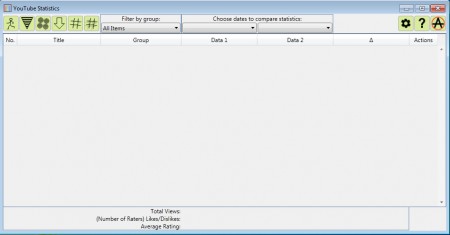
If you had a previous version of the program installed, after you download and install the latest you can migrate YouTube statistics and just continue using the new version without needing to rebuild view history of your files. This comes in handy because like this it’s easier to compare the success of your videos. Before YouTube hits tracking is possible with this software, they have to be loaded first, let’s see how to do that exactly.
You can also check out YouTube Leanback to watch YouTube videos in TV mode.
Tracking YouTube video hits with YouTube Statistics
Loaded videos can be sorted in groups, this is important to know because it’s easier to start loading videos into their respective groups while you’re adding them, then doing it later on. You can create your own groups:
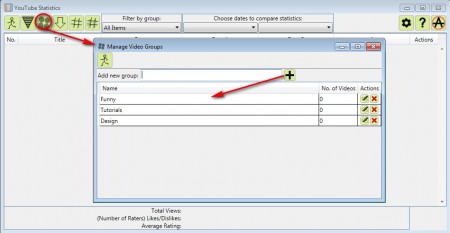
Name them whatever you see fit, and then place appropriate videos inside of them so that later on it’s easier for you to find and filter videos that you need. After you’ve created all the groups that you need, open up the Add videos dialog, it’s located left of the Create groups button:
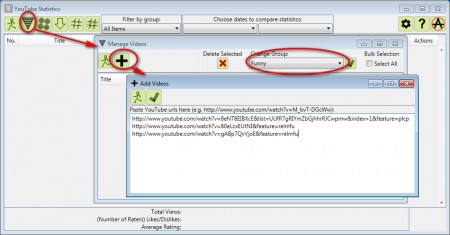
Another pop up window will appear, first change the group on the right side of the screen so that it fits the videos that you are adding. Then click on the plus sign and yet another, third pop up will appear where you actually add videos. After you’re finished, videos should now be added to the main list but they will not have stats posted next to them right away, you’ll have to do that manually by clicking on the Download button:
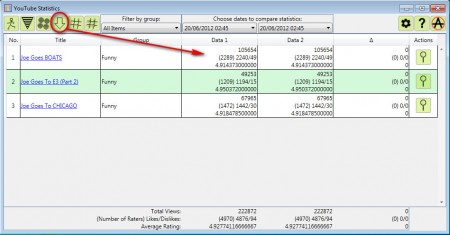
Here’s where things get a lot interesting. There’s a lot of different information and options available, here are some of the features that this YouTube video statistics tracking software has.
- Number of views tracking
- Likes and dislikes tracking
- Average rating tracking
- Export YouTube stats to Excel
- Statistics comparison of two different dates
- Extended details about the video window, only YouTube video info
Statistical comparison of videos on two different dates is what makes this tool very interesting. With the help of this Tool you can keep track of video stats changes from day to day, in fact you can check how many views a video got every hour, only it doesn’t make much sense since YouTube doesn’t refresh video stats on their end that often.
On the top of the window, where it says Choose dates to compare statistics you can choose for example yesterday’s stats and in the other window select the today’s stats, and then the program will report to you what kind of changes occurred, how many new views, likes, dislikes and how much did the overall rating change. Very useful feature, but the best part is that you can export statistics to Excel if you want to show them on other computers. If you’re a YouTuber download YouTube Statistic, free application for YouTube stats tracking and see which one of your videos are most popular in just a few clicks.
