CleanAfterme is a free software which allows one to clean his/her hard disk and improve computer performance with just a few clicks.
CleanAfterMe greatly enhance one’s computer by removing useless system files and getting rid of some registry entries which are no longer necessary.
CleanAfterMe is the ideal program for the average user who keeps complaining about his/her computer startup speed and performance in general but can’t manually solve the problem.
Also, CleanAfterMe can also be useful for more advanced users.
Cleaning everything with a few clicks is always easier than manually navigating system folders finding useless files. Not to mention that a little mistake could damage not only your operational system but also your whole computer.
With CleanAfterMe one may safely remove system files without worrying about deleting an essential file.
How to use CleanAfterMe:
Interface of CleanAfterMe is quite simple and easy to figure. On the main panel one can see several sections including folders and some registry entries. The others contain the sections’ descriptions and corresponding paths.
Check the boxes by the right side of the sections that you want to be cleaned.
One can either select everything or just some isolated sections, check the boxes according to your preferences.
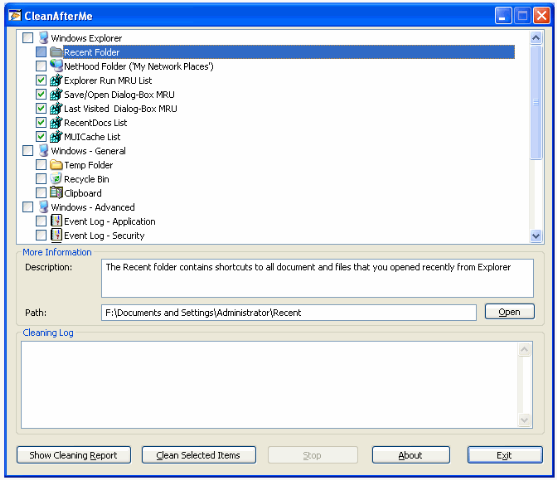
However, note that deleting registry files can be dangerous for they might compromise your operational system. So only delete or clean registry sections if you are absolutely positive that it won’t harm the computer. It is a good idea to backup registry before trying this. You might also want to create a system restore point before tweaking settings.
Once everything is properly checked one can start removing and cleaning the files by clicking on “Clean Selected Files”. After the cleaning is done a report log is available and can be accessed by clicking on the corresponding box.
Features of CleanAfterMe:
- Speed up your computer with just a few clicks.
- Quickly clean and get rid of useless system files.
- Remove useless registry entries.
Other easy to use software to tweak your computer settings are: Glary Utilities, and Tweaknow.