PhotoLikr is a combination of a free photo viewer, free photo management application and a free image uploader which supports 5 different online image sharing services where you can upload your photos, for free of course. PhotoLikr is a very modern looking application which you can easily use, and it could even replace Windows Image Viewer as your default image viewer, because it offers a lot more useful tools.
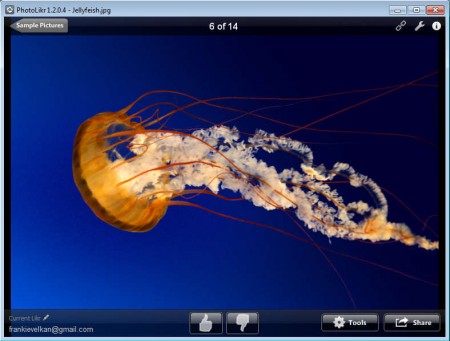
On the image above we can see PhotoLikr with a small image collection already opened. Next to the free PhotoLikr which is the topic of this text, there’s also a paid version where you can create image galleries, but for that you’re gonna have to say goodbye to a few bucks. If you’re only looking for a image viewer then PhotoLikr is just the thing you need, since next to everything that we said up to now there’s also:
- Easy image management with a rating system included
- Tools for deleting and moving images depending on their rating
- Create profiles where you store your photos
- Large list of supported formats – JPEG, GIF, PNG, BMP and 11 more
- Support for opening RAW image formats – Fuji, Minolta, Olympus RAW
Among the supported online service where images can be uploaded is even Google+. This recently launched and increasingly popular social network from Google gained a lot of followers and there’s probably a lot of users out there who are looking for a efficient way of how they can upload photos to their Google+ accounts. With PhotoLikr you can do that in just a few clicks of a mouse, and you can upload entire collections at once or separate images depending on their rating. Supported services for online uploads are:
- Google+
- Picasa
- Gmail
- PhotoOnWeb
- Minus
Similar software: Magix, Pictmo, 5 Free Facebook Uploaders.
How to view, manage and upload images online with PhotoLikr
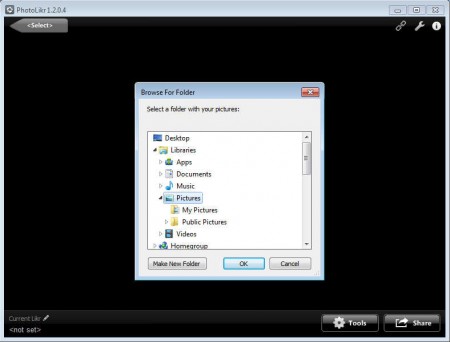
First you’re gonna have to open your image gallery. When starting up PhotoLikr for the first time, you’ll be asked to select a folder with your images:
Once you do that, you should see your images being loaded into the image browser where you can easily navigate through them, even open a fullscreen slide show. Images can be rated, notice the thumbs down and up at the bottom of the application screen. Based on this rating, they can be either deleted or moved to the favorites folder, so think of this more of a marker of which images to keep and which not.
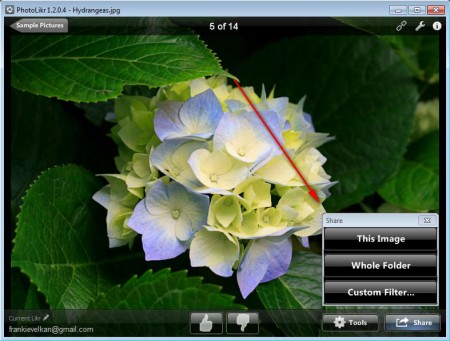
If you want to upload photos, click on the Share button in the lower right corner, and from there select if you want to upload the entire collection, only one image or if you only want to upload images which you’ve given good ratings. After selecting one of these, you’ll be presented with a window where you’ll need to login to the selected service, select where to upload and click OK, your images should be online shorty after, depending on your connection speed, of course.
Conclusion
Large collections of photos are always a problem to manage. There’s always some of them which didn’t turn out looking good, and with the rating system, you can easily weed out images that you don’t want, and view and/or upload online those that you like. Download PhotoLikr free.
