Facetones is a free Android app to sync Facebook profile photos with contacts on Android. Now, whenever your Facebook friends call on your phone, you will see their photo slideshow in incoming calls screen.
Facetones app identifies the contacts which you have selected and import photos from Facebook which plays in the form of a slideshow on an incoming call. The app enables the photo slideshow on only the selected contacts which you have synched with the Facebook profile of that particular friend on Facebook.
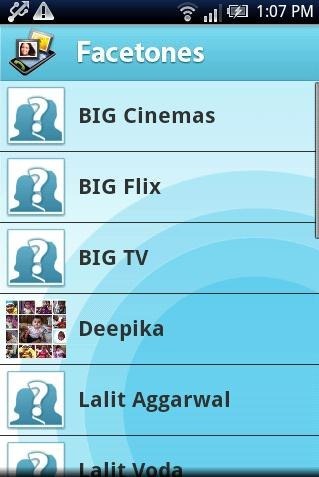
On launching Facetones, the app automatically imports all the contacts from the phone book of your Android phone. Now, you can select any of the contact and sync it with the same person’s Facebook profile, so as to play the slideshow of profile pictures.
Steps To Use Facetones App To Get Facebook Photo Slideshow On Android:
Step 1: Download and install Facetones app on your Android phone.
Step 2: Launch the app and then login to your Facebook account to allow the app to sync with your Facebook account.
Step 3: Now, after a while, the app imports all the contacts from your phone book saved on your Android phone.
Step 4: Tap on a contact and then select the appropriate person’s Facebook profile.
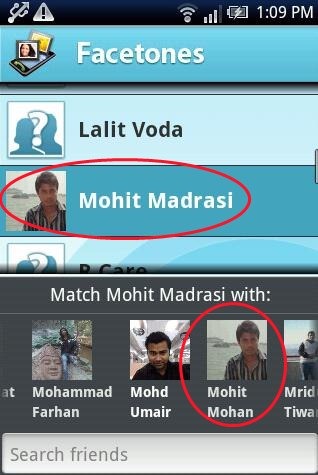
Step 5: Now, exit the app and whenever an incoming call lands on your Android phone with the selected contact, you will see the slide of your friends Facebook profile photos on your Android screen.

Features OF Facetones App:
- View slideshow of Facebook photos on incoming calls.
- Select any contact from your Android phone and sync it with your Facebook account.
- The app is smart enough to give suggestions for perfect matches from Facebook.
- You can also match the contacts from any Facebook friends profile manually.
- Caller screen looks great with full screen photo slideshow.
- No extra settings required.
Install The App:
Click here or scan the QR Code below to download Facetones app from our App Store. You can also head to Google Play Store and search for “Facetones” app on your Android phone. Facetones app is little nifty app that can easily change your caller ID screen on your Android phone by playing a beautiful slideshow of Facebook pictures.

Make your caller ID live with your friends latest Facebook profile pictures and skip of reading the name and identifying the caller. If you find any other caller ID Android app, then do let us know in comments below.
You can also check the tutorial to set any video on your Android caller ID.
