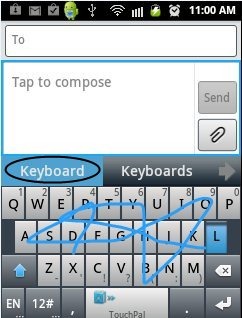
TouchPal Keyboard is a free Android app that enables a sliding keyboard on Android at the time of composing any text. Android Market now provides you sliding keyboard by which it becomes easy for you to type on a QWERTY keypad by just sliding and joining the letters. No need to tap each letter and compose a text. Just slide the letters with this Android Keyboard and your text will be ready. This Android slide keyboard is also a QWERTY keypad, but it is faster, intelligent and easy to use. Also, get rid of those silly mistakes which you normally do while typing on a touchscreen device.

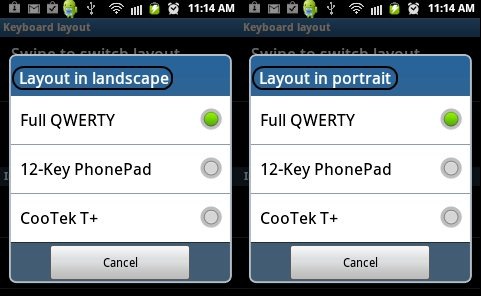
TouchPal Keyboard also supports three layouts that is Full QWERTY, CooTek T+ and 12-Key PhonePad. By selecting among these different layout, you will have different keyboard on Android device. This Android keyboard is the best keyboard in the Android market for almost all Android devices. It is also an intelligent keyboard as it has the option of spell check, advanced prediction and also word prediction. With this, it is a rare possibility of doing any spelling mistake or error. You can also select any language from the list of language given.
You can also check out How To Enable Emoticons in iPad reviewed by us.
Some Key Features Of TouchPal Android Keyboard:
-
It is a QWERTY keypad with sliding option.
-
It provides you multi language option. You can select language of your choice from the list of languages available.
-
It has an option of voice input. But this feature is supported by only 2.2 and up Android versions.
-
It is fast, easy and intelligent.
-
It provides three layouts that is Full QWERTY, CooTek T+ and 12-Key PhonePad.
-
The settings option provides you Advanced prediction, automatic spell check and many more.
-
It provides you the dictionary with online update.
-
It also can make a backup and can also restore the dictionary in SD card.
-
Also you can enlarge the height of the keyboard.
Also check out myPhoneDesktop, to type in iPad, iPhone with computer keyboard reviewed by us.
How To Install TouchPal Android Keyboard:
-
Just login to “Android Market” or Scan the QR Code below.

-
Click on “Search” tab. Type “TouchPal Keyboard” in search tab.
-
Click on “TouchPal Keyboard”.
-
Click on “Install”.
The free TouchPal Android Keyboard will be automatically installed. Just make your texting easy and fast with this modern and intelligent Android slide keyboard.
