DiskCryptor is a free and open source alternative to popular disk encryption program DriveCrypt. DiskCryptor is a free encryption program that can encrypt all disk partitions, including system partition. This helps in securing your data from theft and unauthorized access. DiskCryptor has a very good encryption performance, so that you do not see any noticeable degradation in performance.
DiskCryptor has very secured algorithms for encrypting your disk. It supports following encryption algorithms: AES, Twofish, Serpent, AES-Twofish, Twofish-Serpent, Serpent-AES or AES-Twofish-Serpent. You can choose the encryption algorithm of your choice.
Apart from encrypting system and disk partitions, it also supports encryption of external USB drives, CDs and DVDs.
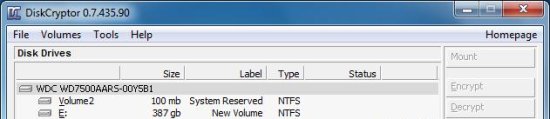
Encrypt and Decrypt disk partitions with DiskCryptor:
DiskCryptor is very easy to use. When you launch this free disk encryption software, it will list out all the internal disk partitions and external drives attached to your system, along with their size. You can select any disk you want to encrypt from here, and press the “Encrypt” button from the side panel. Be careful while selecting disk partition from the interface, since the partition you select won’t get highlighted and you may end up encrypting some other disk partition.
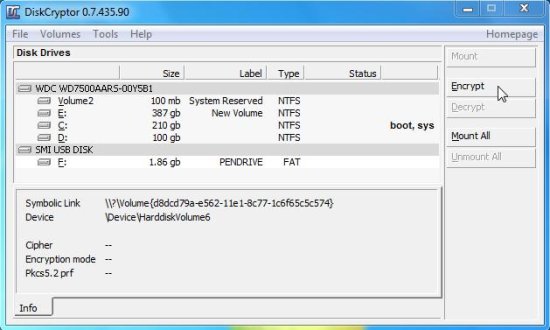
After that, DiskCryptor will ask you to select an encryption algorithm and enter a password to password protect the encrypted disk partition.
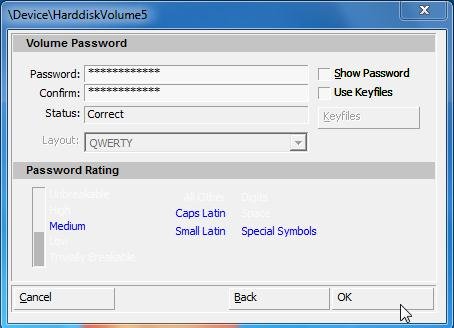
You can then, press the “OK” button to start disk encryption. It will show the encryption status at the bottom panel and encrypts the data within few minutes.
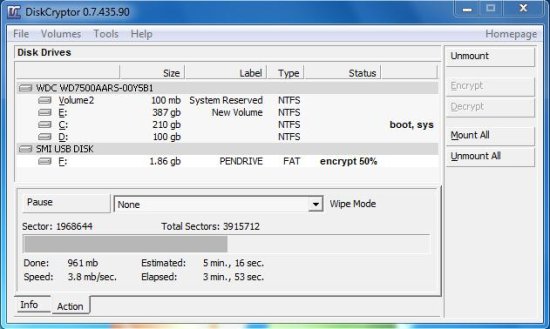
Whenever you want to decrypt the data back, you need to launch the app again, select the encrypted drive form it’s interface, tap on the “Decrypt” button, enter the same password which you have chosen at the time of encryption, and press OK. that’s it!
Also check Vanish Crypt to create encrypted virtual hard drive where you can store your files and data for safe keeping.
Key Features of this free Disk Encryption software:
Here are some of the features of DiskCryptor:
- DiskCryptor supports FAT12, FAT16, FAT32, NTFS and exFAT file systems. It even works with RAID volume.
- DiskCryptor can also encrypt external USB storage devices, and can create encrypted CD’s and DVD’s.
- High Encryption Performance.
- It can encrypt all partitions, including boot and system partition.
- This free disk encryption software is fully compatible with third party boot loaders.
- The program uses AES, Twofish, Serpent, AES-Twofish, Twofish-Serpent, Serpent-AES or AES-Twofish-Serpent in XTS mode.
- It provides support for keyfiles.
- It also supports automatic mounting of external drives and disk partitions.
The Final Verdict:
DiskCryptor is a nice, open source alternative to DriveCrypt, which provides strong encryption algorithms to encrypt your disk partitions, system partitions, and other external media. If you carry sensitive data on your machine, DiskCryptor will help you in ensuring that it does not falls in wrong hands. DiskCryptor is completely free, open source, and easy to use.
