Stylebot is an add-on for users of what can be safely called the world’s most popular internet browser-Google Chrome. It allows users to edit a webpage, in terms of stylistic elements, that uses advanced CSS functionality. A number of websites use these advanced functionalities and the users can edit individual elements on the websites to personalize their browsing experience.
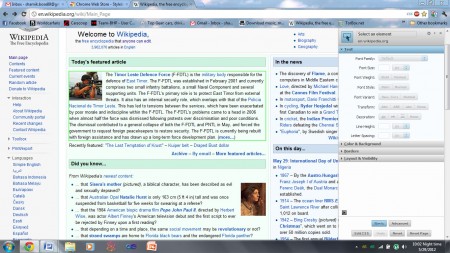
Features of this Google Chrome extension:
Stylebot incorporates easy-to-use functionality in a lightweight package. The most important features of this Chrome add-on are as follows:
- Ease of use – The Chrome extension is designed to aid those users who are not familiar with web development and design. As a result of this goal, it is very easy to use.
- Access – The Chrome extension can be accessed on any website that allows it to be used. On other websites, it is hidden away.
- Lightweight – Stylebot is a relatively small add-on (a few hundred KBs), especially when compared to other add-ons available for Google’s browser. As a result, it doesn’t use up much space on the client machine.
- Quick – All changes are reflected immediately on the website that are being edited.
- Saving for later use – Any changes that one makes to a website are persistently saved, which means that it doesn’t have to be re-applied every time the website is visited.
- Publishing – A user can choose to publish their personal styles which can be downloaded from stylebot. For uninitiated users, this is a great way to learn and edit by example.
 Downloading and installation:

This add-on, like every other Google Chrome add-on, is available for download from their Chrome Store which can be accessed from the default home page. Otherwise, it can be downloaded from here.
It is a small download, only a few hundred kilobytes in size, and integrates seamlessly with the browser without the user even realizing it. An agreement is required for allowing the extension to access all browsing data but that is only because the extension is expected to run on all tabs. It doesn’t access any surfing data otherwise, which is good news for those who are paranoid about privacy.
 Interface and working:
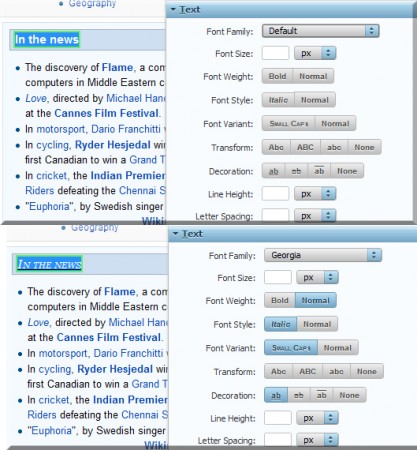
The interface is very simple. When a page allows usage of the extension, the CSS icon can be clicked to activate the extension. When that is done, the extension figures out which of the elements on the webpage can be modified and highlights them using a green box. The various modifications that are available include modifications to text, color, background properties, borders, etc. It even includes an option that lets the user hide certain elements on the page. This can come in particularly handy at times. The modification comes in two flavors. The above mentioned properties can be viewed in ‘Basic’ mode. In ‘Advanced mode’, which is meant for advanced users, the user can modify the CSS code itself to add more functionality.
Verdict:
Stylebot is a must-have extension if one likes to tinker with web design or simply wants to have each page to their particular tastes. Pink and red themed, if one so pleases.
