Weeny Free PDF Password Remover is a free PDF password removal software for Windows. With the help of this free password remover you can remove password protection and access restrictions from multiple PDF documents at the same time.
Note that this will only remove passwords from PDF documents, you still have to know what the password is; this isn’t a password cracker.
Similar software: 4Dots Free PDF Password Removal.
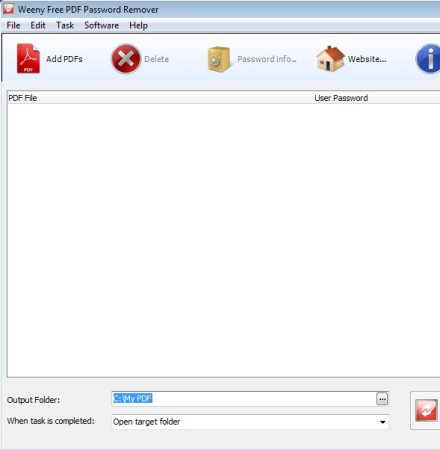
Screenshot above shows us the default interface of Weeny Free PDF Remover. It’s very simple, without a lot of complicated menus to go through. You probably won’t even need to use the standard menu in the top left corner seeing how everything that you need is located in the toolbar down below. All the PDF documents from where you need to remove password protection are gonna be listed in the large empty area in the middle. Output settings like output folder location and actions that you want performed upon task completion can be changed down below.
Key features of this free PDF password removal software are:
- Free with very simple to use interface – remove password in seconds
- Batch password removal – remove password from multiple files at once
- Removes both password protection and access restriction – print, edit
- There’s no limit on the length of the password or their strength
- Password protection info – find out restriction of PDF documents
Removing password protection from PDF documents isn’t easy, especially if you have a lot of files from where you would like to remove password protection. Each file would need to be open individually and saved again without protection. Now with Weeny Free PDF Password Remover you can do that practically automatically, on multiple files at once. Here’s a few pointers to help you get started.
How to remove password protection and access restrictions from PDF documents with Weeny Free PDF Password Remover
Start by selecting the Add PDF’s button from the toolbar at the top. Multiple documents can be opened at the same time, press and hold Ctrl or Shift on your keyboard together with left click, the usual, to select more than one file.
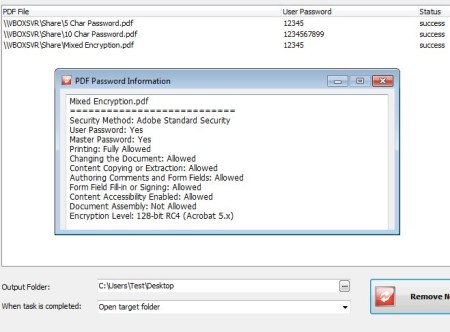
Each one of the documents will have to have its password entered in the User Password column on the list. Left click on it so that the password can be typed. Do this for every document on the task list. At the bottom of the window set the Output Folder and what you want PDF Password Remover to do after passwords and restrictions are removed, open target folder, report and so on. When you’re done, click on the Remove Now button. To check what was removed from PDF documents, select the Password Info button from the toolbar at the top. Once all the tasks are complete, you can open the output directory and collect the password free PDF documents.
Conclusion
Weeny Free PDF Password Remover does a great job and it’s very fast. All the passwords that we tested were removed, no matter how strong they were or what kind of restrictions the PDF documents had. Again, keep in mind that this is not a password cracker, it won’t grant you access to password protected files, you need to know the password in order for it to be removed. Free download.