• Home
  • Software Testing Service
  • About US
    • Privacy Policy
    • Disclosure
  • Write For Us
  • Submit Software
  • Contact Us
    • Subscribe
I Love Free Software
Best free software available all over the web. The free software categories include Windows Software, Social Networking Tools, and software installation videos.


  • Featured
  • Windows
  • Web Applications
  • App Store
  • Android
  • iPhone
  • iPad
  • Windows 8
  • Social Networking
  • Programming Tools

Free VHS to DVD Converter

By Ishan Bansal on February 20, 2011 | Sponsored Links

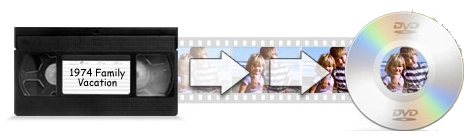
Golden Videos VHS to DVD Converter is a freeware to convert VHS tapes to DVD movies. If you have old VHS tapes, you can transfer video of those to your PC, and then use this free VHS to DVD Converter to convert those videos to DVD format.

Golden Videos free VHS to DVD Converter also improves your video quality during the conversion process, and comes with video restoration tools. It also lets you burn videos directly to DVD using built-in DVD burner.
Golden Video
Sponsored Links

How to Convert VHS to DVD:

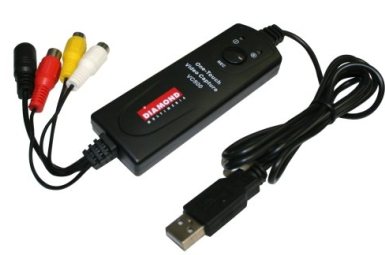
  1. To convert a VHS to DVD, you first need a way to transfer your VHS video to your PC. For that, you can use a RCA to USB cable that connects to RCD output of VCR, and passes the video to USB port of your computer. Such cables are commonly available on Amazon and eBay. Here is a screenshot of one such cable:
  2. video capture

  3. Once you have the cable, or other USB video capture device, you need to download and install this freeware.
  4. After installation, you are ready to convert VHS to DVD. This freeware comes with a nice easy to use interface that has a wizard format.
  5. The opening screen asks you whether you want to create a new recording, or load some previous recording. Choose option of “New Recording” from this.
  6. After that, connect your VCR to your USB port. Put VHS tape in that, and press Play on it.
  7. Then, in Golden Videos, select the video and audio device from which it needs to capture video. In most of the cases, it would automatically detect that. It will then start capturing that video.
  8. Once recording is complete, it gives you many options:
    • You can preview video
    • Convert video to DVD format, and burn to DVD.
    • Save video as a file in your PC.
    • Upload recorded video to YouTube
    • Convert VHS video to iPod, iPhone, PSP, and other portable devices format.
    • Edit VHS video
  9. Just choose from one of the actions above, and it will save your file accordingly.
Also check out ipad video converters, iPod video converters, and Android video converters.

Download Golden Videos VHS to DVD Converter free.

Home Page: Click Here
Works With: Windows 7, Windows Vista, Windows XP, Windows Server 2008, Windows 2003
Free / Paid: Free

Link to This Page:


You Might Also Like:

  1. Hewbo Free Video Converter for iPhone, iPad, iPod, Android
  2. Free FLV Converter: Leawo Free Video to FLV converter
  3. Free Image to Video Converter: Convert Images to Video
  4. Movies2iPhone: Free Movie to iPhone Converter
  5. Convert Any Video to AVI with Leawo Free AVI Converter

Be the first to know about Latest Free Software:

  • Join us on Facebook
  • Subscribe to our RSS Feed
  • Follow us on Twitter
  • Subscribe to Email Updates:

Posted in Audio Video Converters, Video Software | Tagged vhs to dvd converter | Leave a response

Ishan Bansal

« Previous Next »

Featured Posts

  • 5 Free Snippet Managers To Manage Code Snippets
  • 5 Free Online Tools To Test Website In Different Resolutions
  • 5 Free Microsoft Access Alternatives
  • 5 Free IP Notifier Apps
  • 5 Online Mapping Websites
  • 5 Free Alternatives To iGoogle
  • 7 Websites To Download Windows 8 Themes
  • 5 Best Free Calculator Apps For Windows 8

Join More than 15,000 Followers!

Enter your Email Address
  • Submit Software
  • Software Testing Service
  • Write For Us
  • About Us
  • Privacy Policy
  • Disclosure
  • Contact Us

Link to Us:

Did we review your software here? Feel free to flaunt this badge on your website:

Free Software

Use this Code:

Copyright © 2013 I Love Free Software.

Powered by WordPress and Hybrid. New - H