• Home
  • Software Testing Service
  • About US
    • Privacy Policy
    • Disclosure
  • Write For Us
  • Submit Software
  • Contact Us
    • Subscribe
I Love Free Software
Best free software available all over the web. The free software categories include Windows Software, Social Networking Tools, and software installation videos.


  • Featured
  • Windows
  • Web Applications
  • App Store
  • Android
  • iPhone
  • iPad
  • Windows 8
  • Social Networking
  • Programming Tools

Show Bing Image as Background for Google.Com

By Ishan Bansal on May 19, 2012 | Sponsored Links

One of the things I love in Bing is its beautiful homepage. Everyday Bing features one or more images which are absolutely gorgeous. Google also tries to dress up Google.com via Google Doodle, but I personally love the background images that Bing.com shows.

So, when I read about this Chrome extension that can take Bing background images, and set them as background image for Google.com, it seemed quite interesting. And when I tried it, I found it even better than I had anticipated.

Bing Wallpaper for Google Homepage is a free extension for Google Chrome that can take images from Bing, and set them as background of Google.com home page. You can choose to see Current daily image from Bing, or any random image that Bing might have previously displayed. After that, whenever you go to Google.com, you will see Bing image has replaced doodly background of Google.com
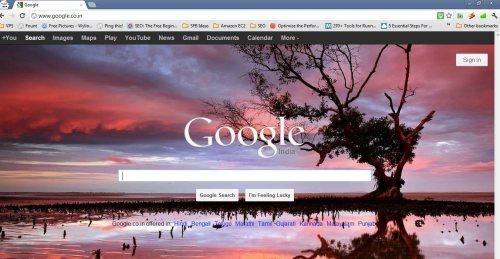
Bing Background Google
Sponsored Links

Apart from showing image from Bing, this extension can also show random featured image from Picasa. If you want to pull images from Picasa related to your favorite search term (like, “Sunrise”), you can just provide RSS feed of that Picasa search, and this will pull images from that feed and will show as background of Google.com.

Here is the complete list of options that this extension to change Google background provides:
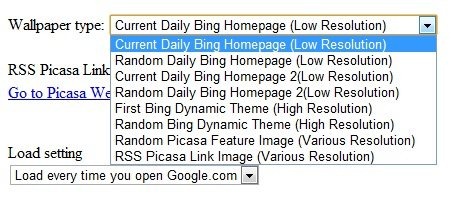
Bing Background Extension Settings

Of course, the changes that this extension makes effect Google.com when opened in Google Chrome browser only. In other browsers, Google behaves as its normal self.

Note: If you have already modified background image of Google.com, then your manual settings will take preference over this extension. I tried that, and saw that Bing image loads momentarily, and then is quickly replaced by the image that I had set manually.

If you want to set Bing images as your desktop background, check out this automatic wallpaper changer.

Home Page: Click Here
Works With: Google Chrome
Free / Paid: Free

Link to This Page:


You Might Also Like:

  1. Add Option to Change Background Image in Google
  2. BingRounder: Set Images from Bing as Desktop Background
  3. Search Bing From Desktop, Set Bing Homepage As Wallpaper: Bing Desktop
  4. Get Wallpapers Matching Screen Resolution From Bing Images
  5. Search Google, YouTube, Bing by Speaking with Speechify

Be the first to know about Latest Free Software:

  • Join us on Facebook
  • Subscribe to our RSS Feed
  • Follow us on Twitter
  • Subscribe to Email Updates:

Posted in Plugins | Tagged automatic wallpaper changer, google chrome extension | Leave a response

Ishan Bansal

« Previous Next »

Featured Posts

  • Top 7 Free Launchers for Android
  • 5 Free Snippet Managers To Manage Code Snippets
  • 5 Free Online Tools To Test Website In Different Resolutions
  • 5 Free Microsoft Access Alternatives
  • 5 Free IP Notifier Apps
  • 5 Online Mapping Websites
  • 5 Free Alternatives To iGoogle
  • 7 Websites To Download Windows 8 Themes

Join More than 15,000 Followers!

Enter your Email Address
  • Submit Software
  • Software Testing Service
  • Write For Us
  • About Us
  • Privacy Policy
  • Disclosure
  • Contact Us

Link to Us:

Did we review your software here? Feel free to flaunt this badge on your website:

Free Software

Use this Code:

Copyright © 2013 I Love Free Software.

Powered by WordPress and Hybrid. New - H