Marqueed is a free community website where you and your friends can get together, create image collections, add photos, add tags, labels, funny captions and then share and comment on interesting photos that you find on the internet or that you have uploaded from your computer to Marqueed.
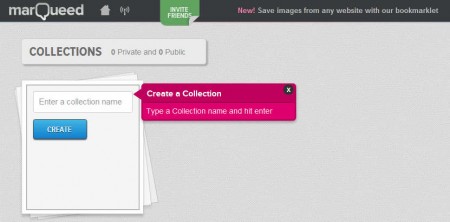
On the image above you can see the default screen that waits for you after you’ve created your Marqueed account. When you’re opening the account for the first time you’ll gonna be greeted with a short three step tutorial, next to also a video tutorial where you’ll be able to see the basics of how Marqueed is used. Image collections would be the most important thing that you need to create in order to start sharing interesting photos with the people that you know.
Similar software: PickDeck, Picozu, PicFull.
How to post, share and comment interesting photos with Marqueed
Using this free online image sharing and commenting social network isn’t very difficult, and the who process of adding images to your Marqueed account is made easy by the fact that you can install a bookmarklet to your browser’s bookmark tab which can be used to add images on the go, while you’re browsing images. Before we do that, we need to create an image collection. On the screenshot above, you can see that creating an image collection is as easy as typing its name and hitting the Create button, which is what we did.
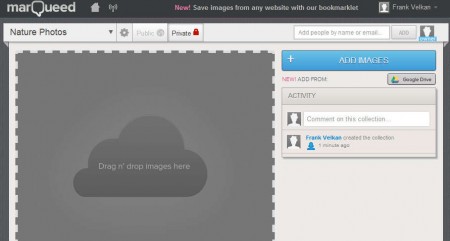
This is the image collection window, where you can start adding images to your Marqueed account to simply backup them or to share them with your friends and family online, with the ability to comment on the photos that you’ve uploaded, notice the activity comment box in the right sidebar. Images can be uploaded either by clicking on that big blue button in the top right corner named Add Images or by simply dragging and dropping them onto the designated Drag n’ drop area.
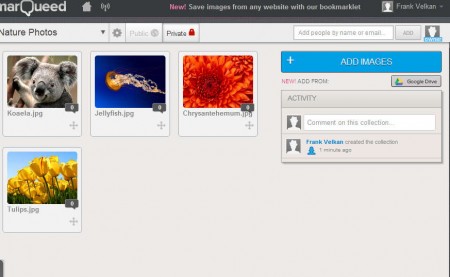
A nice gallery of images that you’ve uploaded will be displayed, and once you click on a certain image you’re gonna be presented with the edit image window where you can add tags, labels, captions and you can even draw on the uploaded image with a very rudimentary pen tool.
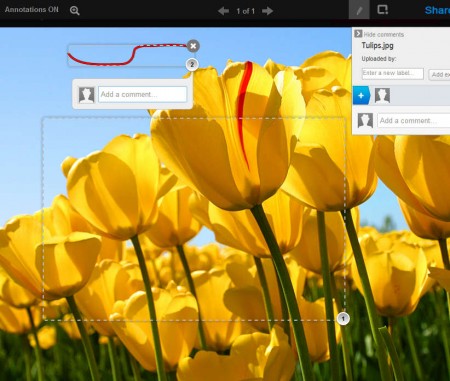
When you’re ready you can click on Public option, located next to Private just above the image gallery, or you can invite friends directly by typing in their Marqueed name or email. On the right sidebar share comments and have fun viewing the photos.
Conclusion
Sharing images with Marqueed is very similar to how Facebook works, only with Marqueed you’re given more tools for adding image tags, labels and you even get a pen tool for some simplistic photo drawing. With bookmarklet you can surf the web and simply mark the photos that you’d like to add to Marqueed image collection, to share it with your friends. Try this free photo sharing community, where you can upload you images, add funny tags and edits, then share them comment with your friends and colleagues.
