Here are 2 Free software for eye exercises on computer. These software alert you automatically when its time to take a break, and relax eyes. They also provide you with some nice eye exercises that you can do to keep your eyes relaxed.
People who spend more than 2 hours on Computer must do some eye exercises to reduce eye strain for longevity of eyes.
ProtectYourVision
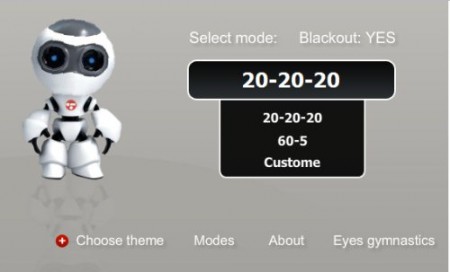
ProtectYourVision is a free website for eye exercises that helps you protect eyes naturally while working on a computer. This free service to reduce eye strain is web based and you can easily give your eyes a rest which it wants. Eye exercises are highly recommended to people who spend at least two hours a day on computer. And their eyes is bound to have problems like eyestrain, blurred vision and many other common but serious problems in their Medical history. However, you can use this easy program when you are using your computer.
With this simple program you can easily relax eyes naturally. This free website that provide eye relaxation exercise delivers you personal eye assistant named EVO, whenever you log on to your computer you can set your EVO as reminder.
EVO works in three simple modes:
20-20 where EVO sets your break time in each 20 minutes. It means after every 20 minutes EVO triggers you a break time, whereby you can close your eyes for 20 seconds and give it a rest. You can either close your eyes or stare at a thing that is as close as 6 meters to you. This way you can give your eyes a nice rest.
60-5 is the mode that gives you breaks in every one hour. After you spent an hour on computer, the alarm triggers and you get a break of five minutes. To let your eyes rest and you can relax meanwhile.
Custom mode is the easiest mode. You can define your own break time and set your break frequency. In the break you must rest your eyes and relax.
The website also gives you eye care tips which you can do daily and rebuild your eyes vision. Read more about Protect Your Vision reviewed by us.
EyeDefender

EyeDefender is yet another solution for strain in eyes that helps you to relax eyes a bit when you work for hours on your computer. This free software for eye exercises is downloadable and works like a personal eye doctor right on your desktop. The software helps you fix break frequency to give your eyes some rest and let them relax.
Just install Eye Defender to use it easily. Once installed, this free software for eye exercises dwells in your system tray. You just have to log on to your computer and set this freeware for interval between breaks and fix break duration. You can take a short rest in between your work and eye defender will remind you of that in every interval.
When its time for a break, this free software to reduce eye strain does one of the following:
- Pictures are displayed from a folder;
- You visual training will start running;
- A screensaver appears on your screen;
- A popup reminder is displayed in the system tray.
Eye Defender signals you that time for your break and you must give your eyes some rest.
This free software to reduce eye strain is easy to customize also. Settings let you define interval between breaks and you can also tell your eye defender as what type of notification you want. Thus, if you do not want unnecessary alarm sounds than you choose for display options. Whereby, the software will trigger your system photos to notify you. Also check our post on Health Tracking Software to remain fit & healthy.
In short, Eye exercises are a must for people who work regularly on computers. Go ahead, try any of these software to reduce eye strain and save your eyes for longer..!
