Here, are 5 free backup apps for Android. Backing up data on Android decreases the risk of losing data which you have stored on external and internal storage. You can easily backup installed apps, contacts, messages, call logs, and media files on Android. Google Play Store has multiple nice backup apps which helps you to create backup of data on Android.
We will discuss about best backup apps which include Go Backup, Super Backup: SMS & Contacts, Clickfree Mobile Backup, and more. Download and install any of them according to your requirements and backup data on your Android.
GO Backup:
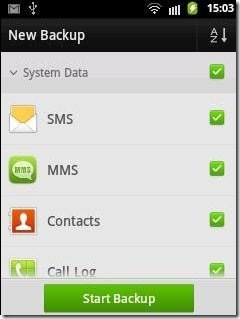
Go Backup is a free Android app from Go Launcher EX team to backup data on Android. Data includes contacts, SMS, and apps. You can easily backup all the SMS, contacts, Call Log, and installed apps on your SD card. Go Backup is an official Android app from the developers of Go Launcher EX. The app even allows you to restore the all the data which you have backed up on your SD card. The app creates a unique folder with the name of Go Backup on your SD card and creates backup files in that folder. Backing up SMS include backing up MMS too. You can even backup all your call logs along with contacts. It is the perfect way to save all your Android data on SD card and restore them at any point of time.
Editor’s Note: I had to recently format my Android phone. Before doing that, I used this app to backup everything in SD card. Once I re-installed Android, I just installed this app, and it automatically picked up backup from SD card and easily restored that. So, I had all my contacts, SMS, call logs back.
Super Backup: SMS & Contacts
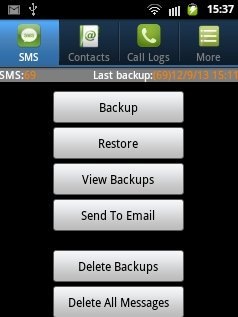
Super Backup is a free Android app to backup SMS and phonebook contacts on Android. The app creates a backup file on your SD card containing all your SMS and contacts. Along with that, the app also allows you to backup call logs on Android. The app creates a separate backup file every time you initiate backup for SMS, contacts, and call logs. Super Backup is a popular app in Google Play Store. You can easily view all your backups and send the backup file created via email. The best part of the app which I like is the scheduling backup option. You can easily schedule backup for SMS, contacts, and call logs.
AppMonster Free Backup Restore:
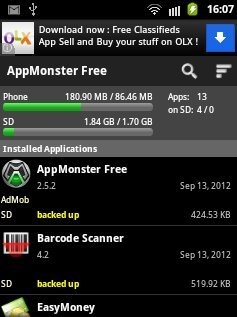
AppMonster is a free Android app to backup and restore installed apps on Android. The app lets you backup all the installed apps on the SD card. On creating the backup of each installed app, AppMonster creates a unique folder on the SD card containing all the backup files of the apps which you have backed up. You can even uninstall any app directly from AppMonster app. This Android backup app is one of the popular app in Google Play Store. Restoring apps gives you the market link and SD card link to install the app on Android. You can even batch backup the apps and manage them all together. Also check out popular Titanium Backup app for Android to backup apps.
Call Logs Backup & Restore:
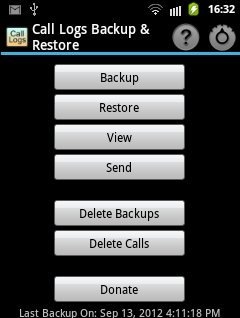
Call Logs Backup & Restore is a free Android app to backup call logs on Android. Call logs include received calls, outgoing calls, and missed calls.You can backup call history of 500 calls on your SD card. The call log is created in XML format on SD Card. You can easily restore all you call logs with one click. The app allows you to view the backed up files and send the backed up files via email, Bluetooth, messages, and the like. You can even manage the call logs by deleting all calls as per your requirements. Like AppMonster app, you can schedule the backup to automatically backup call logs at a particular time on Android.
Clickfree Mobile Backup:

Clickfree Mobile Backup is a free Android app to back data on Android. The app allows you to backup photos, music, videos, documents, applications, bookmarks, contacts, calendar, and SMS. The unique part of this backup app is that, the app allows you to backup media files saved on your Android SD card. Moreover, the app creates the backup on cloud services like Dropbox, SkyDrive, Elephant Drive, Box, SugarSync, and Google Drive. You have to login with your credentials to create backup on that particular account. On top of it, you can also create the backup in the device itself. I truly like Clickfree Mobile Backup app, as the app include everything one might want to backup on his/her Android. I wish they add option to backup Call Logs as well.
If you find any other good backup app for Android, then do let us know in comments below.
iPhone users, check out contact backup apps for iPhone.
