Funny Call is a free Android app to make funny call on Android. Just make prank calls to your friends and others with your Android. This Android calling app changes your voice by giving it different effects like alien, ransom, low, chipmunk, etc. This way you can easily convert a normal call into a funny call.

The app allows you to make the call from the app itself. Funny Call app is unable to convert your voice into a funny voice on a normal phone call. If you want to convert your voice, then you need to make calls from the app itself. Also, for making calls from Funny Calls app, you need to purchase call minutes from its store.
If you have minutes in the app, only then you will be able to make funny calls from the app. Initially when you install the app, you can get free minutes from its store. You will have to download a recommend app to get these free minutes. In addition to all this, when you make a call with Funny Call app, the app will display some other number on the caller ID of the person you are calling.
Another free app that you can try out is Fake Caller app for Android reviewed by us.
Some Key Features Of Funny Call App For Android:
- You can make a funny call anytime from your Android.
- The app changes your voice, and it sounds very funny and odd to the person whom you call.
- Easy to operate.
- The app provides you a dialer from which you can dial any number and make calls.
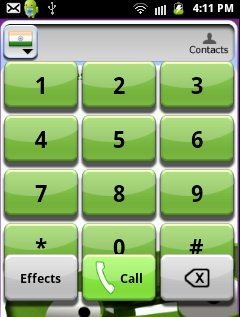
- You can make a call on any contact from your contact list of phone.
- Change the voice effect on a live call from within the app.
- The app works in the background during a live call.
- The app provides you different sound effects which includes Ransom, chipmunk, high, low, lower, super lower, cyborg, echo and alien.
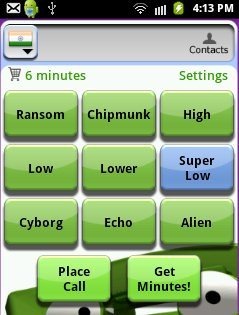
- You can view your minutes left in your account on the main screen of the app.
- Select the country from among the list of countries and the app works accordingly.

Also, check out Talking Caller ID app for Android reviewed by us.
How To Install Funny Call App On Android:
- Go to Android Market or scan the QR Code below.

- You can scan the QR Code using Barcode Scanner app.
- Otherwise, search for Funny Call app in Android Market.
- Out of the search results, select Funny Call app.
- To install, press the install button.
The free Funny Call app for Android will be installed in your phone. Click here to download Funny Call app from Android Market. Now just go funny on your Android with Funny Call app. Fool your friends and others by changing your voice.
