Web Site Publisher is a free FTP client which will monitor changes to website directories locally on your computer and as you save edited files, Web Site Publisher will upload them to the website server and synchronize files and data online with the ones that are on your computer.
There are a lot of FTP programs out there, for example FireFTP, best FTP clients, but not many of them has this type of approach when it comes to file uploading and synchronization.
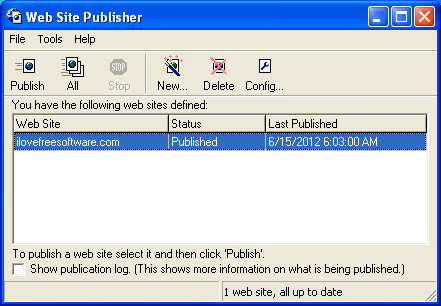
On the image above we can see the default interface of Web Site Publisher, it’s rather simplistic, and if you didn’t have any kind of experience with FTP software before, you’re gonna have to take a few moments to understand all the options that Web Site Publisher has to offer. Website setup is simplified with a wizard that will be offered to you when first starting up the application.
Setting up a website in Web Site Publisher
Hardest step in the website creation wizard would be where you need to enter the FTP username and password and the one before that where the FTP address of your website has to be entered:

For those who don’t know this, FTP information necessary for a successful connection with Web Site Publisher to your websites’s server is something that you should have received from your host when creating your account with them. If you still don’t know what needs to be entered here, contact your host and ask FTP information from them, they’ll be able to help you out. There’s a test FTP connection step inside the program and once that you finish setting everything up, you can test the details that you’ve entered by simply clicking on the Test Connection button.
Refreshing websites via FTP in one click with Web Site Publisher
After finishing with the wizard, you should see the default Web Site Publisher interface like the one that you can see on the first image above. One exception would be that on the list of available websites you should see your own website. Now that the website is configured inside the program, you need to open up the local folder which you’ve configured for Web Site Publisher to use and start creating your website there.
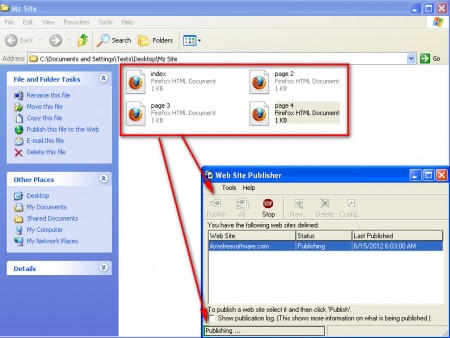
index.html or index.php is the basic file that has to be added to a website, that’s the starting point of a website. Add all the other files that your site has, and then open up Website Publisher, click on Publish and the entire file structure will be uploaded to the server, congrats your website is live.
Now for the most interesting part, next time that you create an edit on a certain file on your website, then you just have to hit publish and all the edited files, files which were changed will be automatically uploaded, other that were not edited will not be uploaded.
Conclusion
Even though newer websites for the most part use various CM scripts, there are still webmasters out there who are only using HTML on their websites and this is the perfect tool for them. Edit your website locally and then just click Publish and have it updated for your readers, try it and see how easy it is to upload websites with Web Site Publisher.