• Home
  • Software Testing Service
  • About US
    • Privacy Policy
    • Disclosure
  • Write For Us
  • Submit Software
  • Contact Us
    • Subscribe
I Love Free Software
Best free software available all over the web. The free software categories include Windows Software, Social Networking Tools, and software installation videos.


  • Featured
  • Windows
  • Web Applications
  • App Store
  • Android
  • iPhone
  • iPad
  • Windows 8
  • Social Networking
  • Programming Tools

How To Login To Multiple Hotmail Accounts On Android

By Lalit Aggarwal on May 14, 2012 | Sponsored Links

Here, is step by step tutorial to login to multiple Hotmail accounts on Android. To login to multiple Hotmail accounts I will use official Hotmail App for Android. With official Android Hotmail app, you can easily manage multiple Hotmail accounts on Android. Good part is that you don’t need to use any separate email client app to just login to multiple Hotmail accounts; the official Hotmail app does that pretty nicely.

Steps To Login To Multiple Hotmail Accounts On Android:

Step 1: Go to Google Play Store or Android Market on your Android phone.

Step 2: Search for “Hotmail” app in Google Play Store.

Step 3: Install “Hotmail” app on your Android phone.

Or, You can also scan the QR Code below to install Hotmail app on your Android phone.

Hotmail QR Code
Sponsored Links

Step 4: Launch Hotmail app on your Android phone.

Step 5: Login to one of your Hotmail account in the app on your Android phone.

Step 6: Now tap on the home button on the navigation bar of the app.
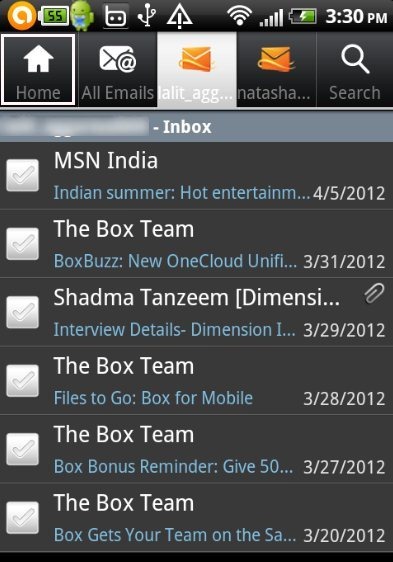
Hotmail

Step 7: Tap on “Add Hotmail Account” button in the app.
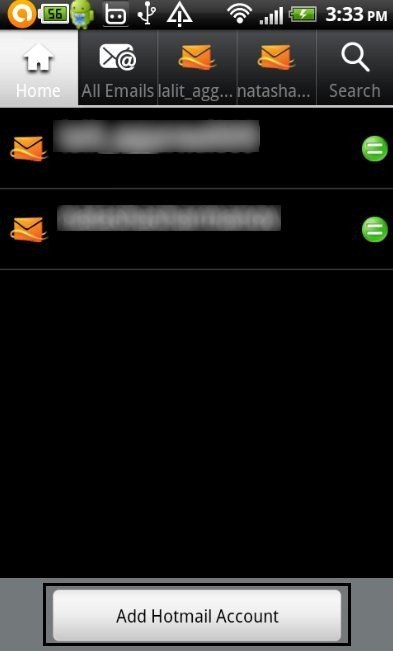
Hotmail add account

Step 8: Login with your another Hotmail account in the app and you are done.

Step 9: Now again tap on home button to add more Hotmail accounts.

So, now you have multiple Hotmail accounts configured in your Android phone. You can easily switch between multiple accounts anytime from the app

This Android official Hotmail app is a perfect app to access and manage Hotmail on Android phone. Apart from this, official Hotmail app offers multiple other smart options to manage mails on Android. You don’t need to use Android browser just to check Hotmail; the official Hotmail app is a much better option.

Also check out official Google+ app for Android.

Home Page: Click Here
Works With: Android 2.1 and up
Free / Paid: Free

Link to This Page:


You Might Also Like:

  1. How To Login To Multiple Google+ Accounts On Android
  2. How To Login To Multiple Twitter Accounts On Android
  3. How To Login to Multiple Yahoo Messenger Accounts On Android
  4. How To Login to Multiple Twitter Accounts On iPhone
  5. How To Login To Multiple GTalk Accounts On Android

Be the first to know about Latest Free Software:

  • Join us on Facebook
  • Subscribe to our RSS Feed
  • Follow us on Twitter
  • Subscribe to Email Updates:

Posted in Android | Tagged android | Leave a response

Lalit Aggarwal

« Previous Next »

Featured Posts

  • 5 Free Snippet Managers To Manage Code Snippets
  • 5 Free Online Tools To Test Website In Different Resolutions
  • 5 Free Microsoft Access Alternatives
  • 5 Free IP Notifier Apps
  • 5 Online Mapping Websites
  • 5 Free Alternatives To iGoogle
  • 7 Websites To Download Windows 8 Themes
  • 5 Best Free Calculator Apps For Windows 8

Join More than 15,000 Followers!

Enter your Email Address
  • Submit Software
  • Software Testing Service
  • Write For Us
  • About Us
  • Privacy Policy
  • Disclosure
  • Contact Us

Link to Us:

Did we review your software here? Feel free to flaunt this badge on your website:

Free Software

Use this Code:

Copyright © 2013 I Love Free Software.

Powered by WordPress and Hybrid. New - H