Editor Ratings:
User Ratings:
[Total: 0 Average: 0]
Defraggler is a file defragementation software. It gives you the capability to defragment individual files and whole folders, without a need to defrag the whole drive. This ensures that your required defragmentation task can be completed pretty fast, instead of waiting for the whole drive to be defragment.
Here are some of the features of this free defragmentation software:
You can choose to defrag one or more files or folders
You can choose to defrag whole disk as well.
Defraggler supports both NTFS and FAT32 file systems.
Defraggler supports all OS after Windows 2000, and includes support for 64-bit Windows as well.
Defraggler is very small in size, and can even be carried in a thumb drive.
Defraggler lets you see the location of files on the disk. It shows you all the files in a list. You can select a file from there, and Defraggler will show you where it is physically located on the disk.
Here is a small video tutorial that explains how to Defrag your files using Defraggler.
Defraggler is totally free for both Personal as well as Commercial use. If you are looking for a simple to use file defragmentation software, give Defraggler a try. Download links, and video tutorial at the end.
Defraggler is a file defragementation software. It gives you the capability to defragment individual files and whole folders, without a need to defrag the whole drive. This ensures that your required defragmentation task can be completed pretty fast, instead of waiting for the whole drive to be defragment.
Here are some of the features of this free defragmentation software:
- You can choose to defrag one or more files or folders
- You can choose to defrag whole disk as well.
- Defraggler supports both NTFS and FAT32 file systems.
- Defraggler supports all OS after Windows 2000, and includes support for 64-bit Windows as well.
- Defraggler is very small in size, and can even be carried in a thumb drive.
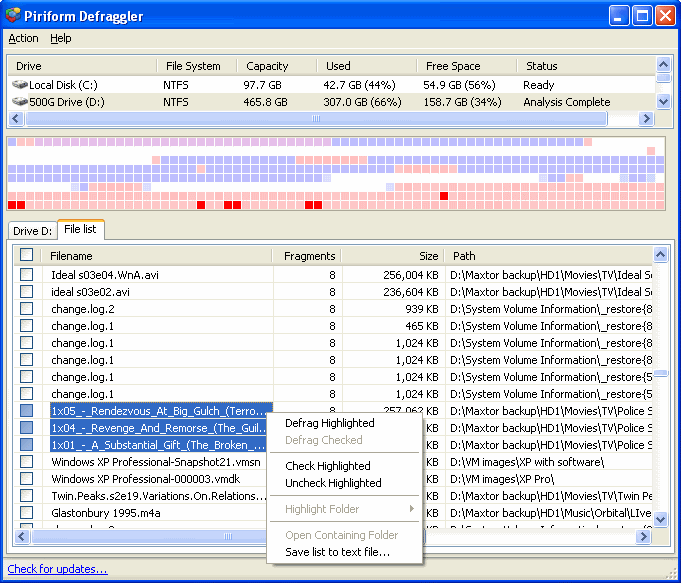
- Defraggler lets you see the location of files on the disk. It shows you all the files in a list. You can select a file from there, and Defraggler will show you where it is physically located on the disk.
Defraggler is totally free for both Personal as well as Commercial use. If you are looking for a simple to use file defragmentation software, give Defraggler a try. Download links, and video tutorial at the end.