• Home
  • Software Testing Service
  • About US
    • Privacy Policy
    • Disclosure
  • Write For Us
  • Submit Software
  • Contact Us
    • Subscribe
I Love Free Software
Best free software available all over the web. The free software categories include Windows Software, Social Networking Tools, and software installation videos.


  • Featured
  • Windows
  • Web Applications
  • App Store
  • Android
  • iPhone
  • iPad
  • Windows 8
  • Social Networking
  • Programming Tools

Image Composite Editor – Stitch Images to Generate Panoramic Images

By Anvin on April 13, 2010 | Sponsored Links

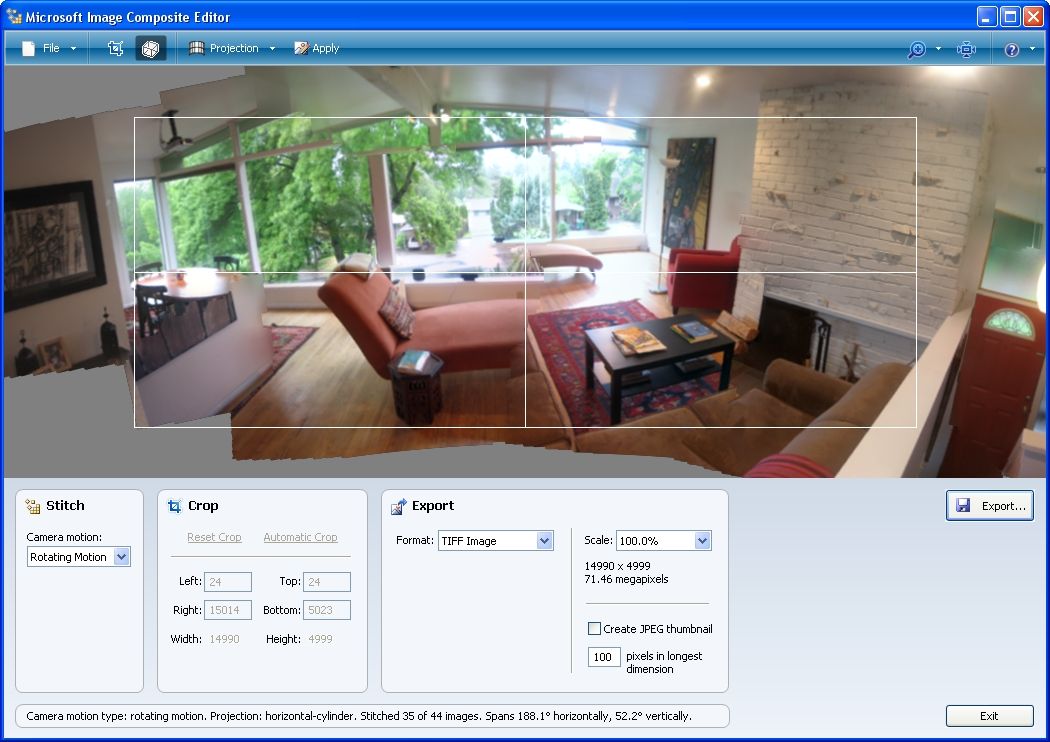
Image Composite Editor is a free panoramic image stitcher that stitches images in high resolution. When you upload several photos from a scene that you have captured from a single camera location, the software generates panorama with the best possible clarity at high-resolution. You can share the resultant panorama with friends and also be saved in desired formats.

Image Composite Editor is very useful when you are trying to take picture of a landscape. You can take multiple pictures, and just stitch them together in Image Composite Editor to form one big picture of the landscape. You can then print that image using some free poster printer, and put them on your wall. That would look awesome.

Sponsored Links

Using Image Composite Editor to Make Panorama

Image Composite Editor is a simple application. In order to make the panorama, you will require at least photos of one object. Once you have them, you will have to transfer these photos from digital camera to your PC. Launch Image Composite Editor application and add the photos to the app. The app will stitch the photos automatically and then find out its type. Making use of the image editing tools (like Paint.Net or GIMP), you can improve the quality of the photo and save them in the desired format

Here are the features of Image Composite Editor:

  1. It is a free application from Microsoft that stitches several images to generate high-resolution panoramic image.
  2. You can share the created images with friends.
  3. Created images can also be watched in 3D by uploading the images on to the Photosynth website.
  4. You can be saved the images in common formats like JPG, TIFF, BMP, PSD and more.
  5. Images can also be saved in multiple resolution tiled format that is used by various panorama viewers such as Silverlight’s Deep Zoom and HD View.
  6. There is no restriction on the size of image for creating panoramas. It can even stitch gigapixel panoramas.
  7. The user interface is very to understand and navigate.
  8. It can automatically crop images to the maximum area of the image.
Home Page: Click Here
Works With: Windows XP, Windows Vista, Windows 7
Free / Paid: Free

Link to This Page:


You Might Also Like:

  1. Pos Panorama Pro: Freeware to Create Panoramic Images
  2. 5 Free Software to Create Panoramic Photos
  3. PanoramaPlus: Free Software to Create Panorama Images
  4. Create Spectacular Panoramic Photos With Panorama Perfect
  5. Cstitch: Convert Your Images to Cross Stitch Patterns

Be the first to know about Latest Free Software:

  • Join us on Facebook
  • Subscribe to our RSS Feed
  • Follow us on Twitter
  • Subscribe to Email Updates:

Posted in Image & Photo, Image & Photo Editors | Tagged image editing tools, photo editing | 1 Response

Anvin

  • Pingback: PanoramaPlus: Free Software to Create Panorama Images | I Love Free Software

« Previous Next »

Featured Posts

  • Top 7 Free Launchers for Android
  • 5 Free Snippet Managers To Manage Code Snippets
  • 5 Free Online Tools To Test Website In Different Resolutions
  • 5 Free Microsoft Access Alternatives
  • 5 Free IP Notifier Apps
  • 5 Online Mapping Websites
  • 5 Free Alternatives To iGoogle
  • 7 Websites To Download Windows 8 Themes

Join More than 15,000 Followers!

Enter your Email Address
  • Submit Software
  • Software Testing Service
  • Write For Us
  • About Us
  • Privacy Policy
  • Disclosure
  • Contact Us

Link to Us:

Did we review your software here? Feel free to flaunt this badge on your website:

Free Software

Use this Code:

Copyright © 2013 I Love Free Software.

Powered by WordPress and Hybrid. New - H