KangaModeling is an application that you can use in order to create UML type diagrams. UML stands form Unified Modeling Language and it consists of graphical notations which are connected in diagrams in order to represent work flow, projects, models and more. KangaModeling allows you to create such diagrams, but it has an interesting way of doing it.
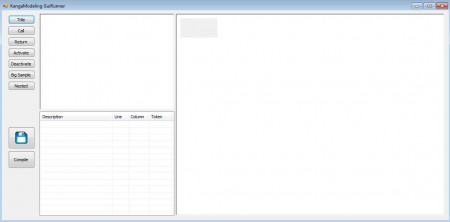
How does KangaModeling UML diagram creator work?
The image above is what you will see when you fire up KangaModeling. Program interface is divided up into three columns. On the far left side you should see buttons which can be used in order to set some basic diagrams to the far right large blank area is located which is where your diagram is shown while it’s being created. What’s more interesting about Kanga modeling are the two windows in the middle, which is where you write code for your diagrams.
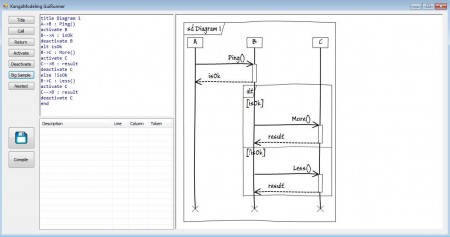
Coding UML diagrams with KangaModeling
In KangaModeling you are not creating diagrams with the help of graphical tools, where you just click and drag items in order to create a project. Program has a different approach to diagrams, it uses code in order to describe how the diagrams will look like. Technically speaking what KangaModeling uses is not code, but it’s a markup language similar to HTML. This would be code of a basic diagram made with KangaModeling:
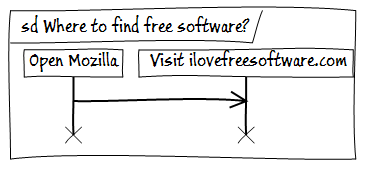
title Where to find free software

Open Mozilla -> Visit ilovefreesoftware.com
KangaModeling code above looks like this:
When creating diagrams in KangaModeling, you write your code in the upper middle window, window that’s below this one is used for code troubleshooting, this is where syntax errors will appear and you can use it on order to help find errors in code if you have large and complex diagrams.
Create UML diagrams faster with the help of presets
Although what you get on the left side under buttons named Call, Return, Activate, Deactivate, Big Sample and Nested aren’t technically presets, you can use them in order to understand better how to create diagrams with KangaModeling. By clicking on these buttons, the Code area will be filled with a diagram example. They go from easier to follow to more complicated, and if you are having problems with understanding how exactly KangaModeling diagram creator works, you can visit the documentation page of KangaModeling in order to learn more on what it exactly has to offer.
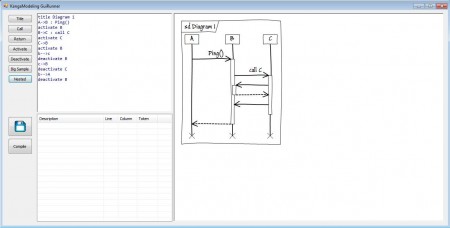
How to save diagrams created in Kanga and what formats are supported?
You can save diagrams that you create in KangaModeling as images. The example that I gave above is a PNG format image but you can also use .jpeg extension, just make sure that you write down the extension after file name while saving your diagram. Export the file that you’re working on by clicking on the diskette icon. Program is very interesting, and despite the word “code” being used here, it’s not very difficult to understand how to create diagrams with KangaModeling. Program is lightweight, it doesn’t require installation and it’s free, it doesn’t cost you anything to give it a spin, maybe you’ll like it.
