Handcent SMS is a free Android app to manage messages on Android. This Android messaging app gives you a new way to manage messages on Android. This Android messaging app provides multiple options to customize and manage your messages on Android in a new way. The interface provided by the app is very interesting and quite simple to understand.

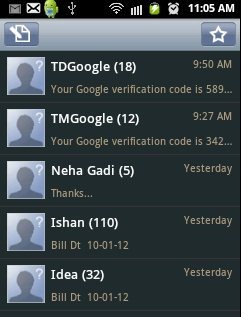
Just install Handcent SMS app and start managing messages on Android. As soon as you install this Android messaging app on your Android phone, the app will automatically import all your inbox messages from your default message application. Compose a new message on your Android with different options. Insert standard smileys, emoticons, pictures, audio, contacts, videos and much more. Also after composing a message, you can allow the app to do a spell check, so that your composed message becomes perfect with no mistakes.
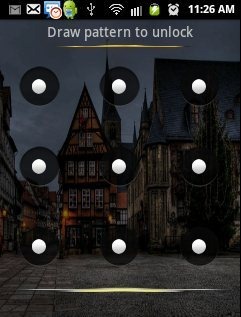
The security system provided by the app is too awesome and very much secure. You can set a password to the app or set a lock pattern to the app, so that no one can access your text messages on your Android phone. The security system of the app also sets the same password or same lock pattern on the default messaging app of your phone, so that no one can access you messages from anywhere.
Also, I tried backing up the messages, but I was unable to backup the messages. The app was showing some error while backing up the messages. Apart from this, this Android messaging app is the best app, to manage messages on Android.
You can also check out Zlango Messaging app for Android reviewed by us.
Some Key Features Of Handcent Android Messaging App:
- You can manage your messages in a very new way on Android.
- Compose a new message and insert standard smileys, emoticons, pictures, audio, contacts, videos and much more.
- Search for any SMS from within the app.
- You can mark all read messages all together and manage them.
- Schedule any task from within the app. You can schedule any text on any number at any time. The app automatically sends the composed text to the number entered on the time set in the app.
- The app provides a Good security system. You can set a password or a lock pattern on the app, so that no one can access your messages.
- You can check your delivered and undelivered messages from within the app.
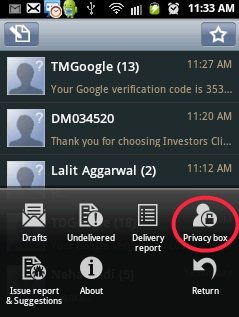
- You can also make any of your contact numbers as a private number from within the app. The private box in the app is password protected. You can view all your private messages in the private box of the app.
- The app provides different display modes, which sets the screen resolution according to the mode selected.
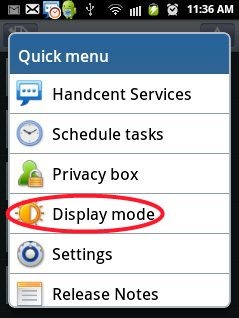
- The setting menu provided by the app is highly customizable.
- You can Sign up with Handcent account to manage your messages in a better way on Android.
- Adjust the background color from within the app.
There are more features and options available in this Android messaging app. These mentioned above are some of the basic ones.
Also, check out Go SMS Pro Android messaging app reviewed by us.
How To Install Handcent SMS App On Android:
- Sign in to Android Market and search for Handcent SMS app in Android Market.
- After searching for Handcent SMS app in Android Market, Tap on install button in Android Market.
- Install the app from Android Market or scan the QR Code below.

The free Handcent SMS app will be installed. Just manage your messages in a very new way with this Android messaging app. Make you messages safe by securing them with a password or a lock pattern in the app. Be smart with your smart phone.
