CCleaner is one of the most popular PC optimization tool. There are millions of users of this tool. The simple reason for its popularity is that it is absolutely fantastic in what it does, and it is totally Free!
CCleaner removes the unwanted files from your PC, and tweaks registry entries. This helps in recovering extra hard disk space and makes Windows run faster. It’s a great PC Optimization tool and a must have for all Windows users.
CCleaner basically consists of 3 different components
- System Cleaner.
- Advanced Registry Cleaner.
- Tools for Startup Management, Uninstalling programs and applications, Finding duplicate files, System Restore, and Wiping disk drives.
System Cleaner
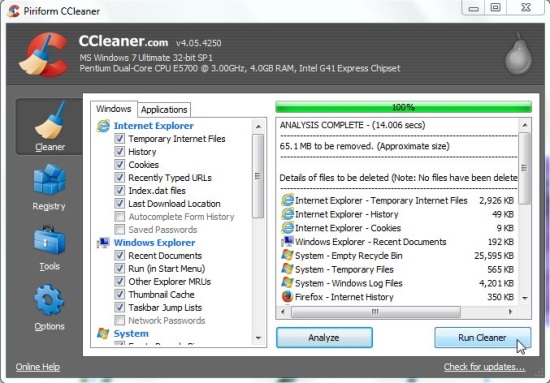
CCleaner comes with an advanced system cleaner that can delete unwanted files from all over the system, and also remove the temporary files. CCleaner is able to clean temporary file cache, URL history, download history, cookies, hidden index.dat files from all popular browsers, including Internet Explorer, Firefox, Google Chrome, Opera, and Safari. Apart from that, it is able to clean the Recycle Bin, CLipboard, Windows log files Windows temporary files, recent documents and run history on the Start menu, memory dumps, disk file fragments, tray notification cache, size and location cache, user assist history, custom folders, and IIS log files.
Out of this vast list, you can select which components you want to clean, and which ones you want to leave as it is.
Advanced Registry Cleaner
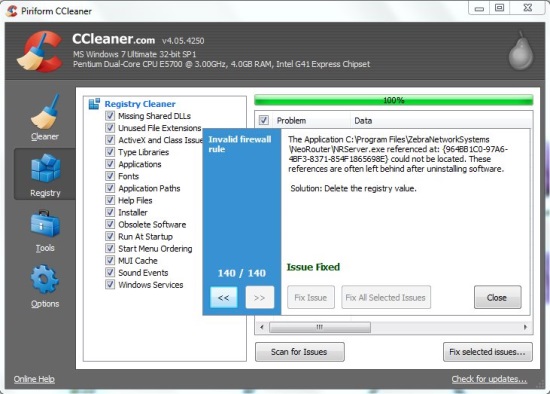
CCleaner comes with an advanced Registry Cleaner. This scans your registry for orphan registry entries that are no longer required, inconsistent registry entries, and other problems with the registry. Then it gives you option to fix all those problems. CCleaner also lets you backup your registry first before you delete any file, so that you can recover registry later in case of any problem.
This Registry Cleaner can check for the file extensions, ProgIDs, ClassIDs, ActiveX controls, uninstallers, shared DLLs, icons, fonts, invalid shortcuts, help file references, application paths, and more.
Other Tools
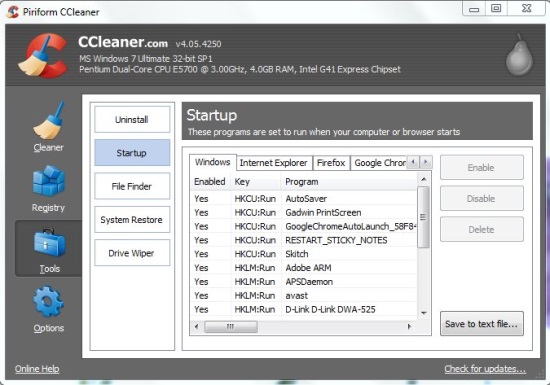
CCleaner provides tools for managing the programs that run when Windows starts. You can select or unselect the programs as per your desire. It also includes an uninstaller to delete any unwanted programs. Plus, allows you to search for duplicate files, wipe disk drives for free space, or restore system to the desired system restore point.
Looking at all the above features, you would have realized that CCleaner is a very comprehensive tool to speed up your PC by removing unwanted files, and tuning up registry.
Also check out Glary Utilities.
