MyRouter is a free application that turns your Wi-Fi enabled Window 7 computer into a WiFi router. The program also lets you share your internet connection with other Wi-Fi enabled devices. MyRouter supports all wireless devices including laptops, smartphones, tablets and even gaming consoles like PS3 and Xbox.
Features
- Simple and user friendly interface
- Share internet connection with all other Wi-Fi devices
- AES encryption algorithms are used to protect your data
- Port forwarding addition, editing and removal.
Check out free wireless hotspot detector reviewed by us.
How convert your desktop into WiFi router
Installation is very simple and uneventful. The interface is very well laid out and very simple. On launching the application, it loads network information like the computers network name and available internet connections. On the configuration section, set an appropriate Wi-Fi name or use the default which is your computers name. You can secure your Wi-Fi network with a password which you enter in the Password text field. Select the internet connection you want to share from the dropdown of available internet connections. Set the maximum number of connections and click Connect to start sharing.
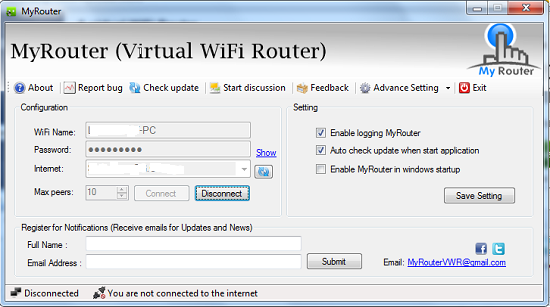
The settings section allows you to configure MyRouter. You can allow the program to record events and keep log files by checking the Enable logging MyRouter checkbox. You can also allow the application to check for updates when starting up by checking the Auto check update checkbox. You can also start MyRouter during start up by checking the Enable MyRouter in Start up checkbox. Click Save settings to save program settings. You can sign up for program update newsletters by entering your name and Email address on the textboxes provided and clicking Submit.
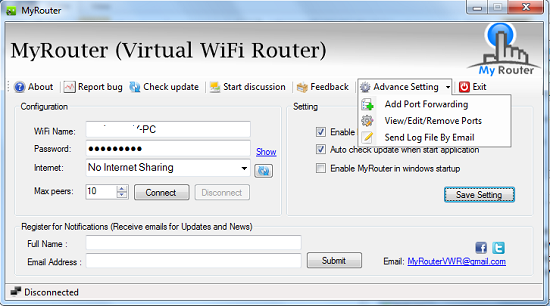
Advanced settings can be accessed via the Advance Settings drop-down. The dropdown allows you to add port forwarding, view, edit and delete ports and send log files via email. To forward ports select the Add port forwarding option, enter a valid port number, choose between TCP and UDP protocols, enter a description, enter an IP address and click Save. Forwarded ports can be edited, deleted and viewed by clicking Viewports menu. The status bar show the status of internet and Wi-Fi peer connections. The program also contains links that can be used to Report bugs, Check for updates, start a new discussion on the products page or leave user feedback on the developers page.
Also check out how to convert your laptop into a wifi hotspot.
Opinion
Very easy to use and configure your PC into WiFi router. Everything is conveniently placed in one interface.
Verdict
MyRouter offers you a simple, fast and secure way to share an internet connection with the help of WiFi router.
