Norton Identity Safe is a free software for online password storage and retrieval. Security experts agree: most computer users need help when it comes to passwords. The passwords most people use are much too easy for the wrong people to guess, but passwords that are strong are hard to remember. It’s much easier for you to remember your anniversary or the birthday of your oldest child, and it’s really hard to remember something like #1B*wgr$#. It’s also recommended that you use different passwords for each account or secure server. Norton Identity Safe is a browser add-on that detects usernames and passwords and stores them on the Norton servers, making it so you can have strong passwords that are hard to guess, and you only have to remember your Norton login information.
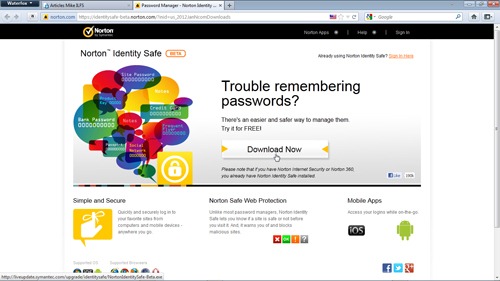
Safe and Easy Download and Installation
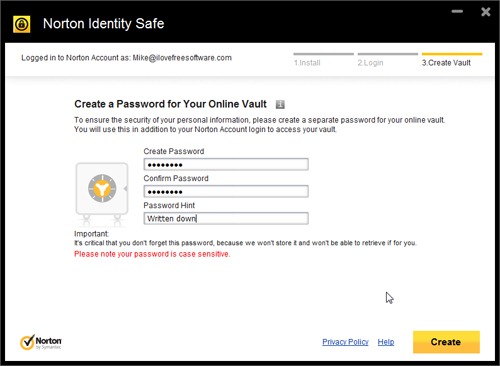
One of the things I like the least about quite a few of the installer packages that I deal with every day is that they try to make more changes to my system than just installing the software I’m reviewing. Some programs add unwanted toolbars, others change the default browser, and still others change your homepage. The worst ones do all three. I’m happy to report that Identity Safe from Norton isn’t one of these. The only thing the installer package installs is the Identity Safe browser add-on. During the installation process, you will be asked to create a Norton Vault account. If you’re using any other Norton programs, such as Norton 360, you’ll have already done this, so this step will be skipped.
Works in All of the Most Popular Browsers-Mostly
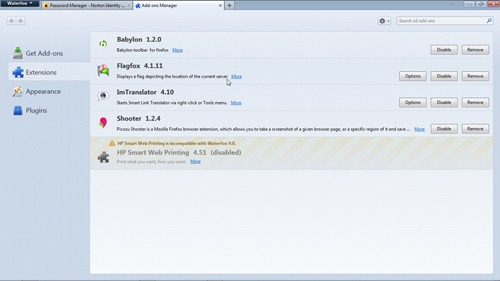
The Identity homepage says it works in Windows, iOS, and Android, and Internet Explorer, Google Chrome, Firefox, Safari, and Opera. I don’t use a Mac, didn’t install it on my iPod, and don’t have an Android phone, so I can’t say whether this claim is accurate for those platforms. I can, however, state that it didn’t work properly in my 64-bit version of Firefox 9, Opera 11.61, or Safari 5.1.2. The screenshot I have attached shows my browser add-ons for Firefox, and clearly shows that Identity Safe isn’t one of them. Not even a disabled or non-working Identity Safe. BUT, it was still working, as can be seen by the other screenshots.
What this online password storage Identity Safe Does:
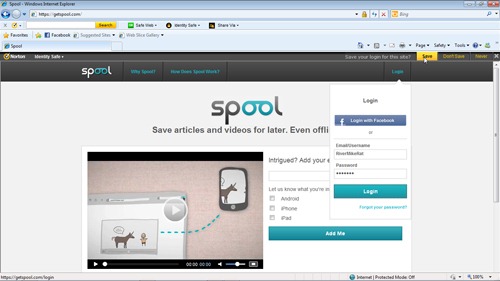
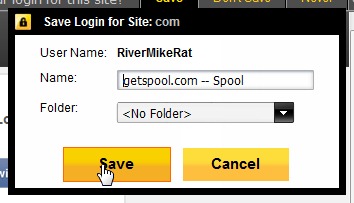
Since Identity Safe is a browser add-on, it’s always running when your browser is open. When you enter your login credentials for a website, it detects this, and pops up a message bar at the top of the browser window asking if you want to save the credentials for that site. You can see this in the screenshot with the word Save highlighted in yellow at the upper right. Clicking this button opens a dialog box with the site address, and the folder you wish to save it in.
I haven’t fully gotten onboard with online password storage utilities yet. I don’t like the idea of someone, even a large company like Norton, having all of my passwords, especially those dealing with financial matters. I feel that a password is designed to keep other people out of my online accounts and I just feel that letting others have those passwords negates the security of them.
