File Extractor is a free extract files software for opening and extracting data from compressed file formats. File Extractor supports a number of common compressed file formats like RAR, CAB, ARC, ZIP and many others.
Features of this file extractor
- Support drag and drop
- Supports a host of compressed file formats
- Simple and easy to use interface
How to use this extract files freeware
The user interface is very simple, stylish and looks great. You can’t help but notice the new look and feel which is far much better than the default windows look and feel on many applications.
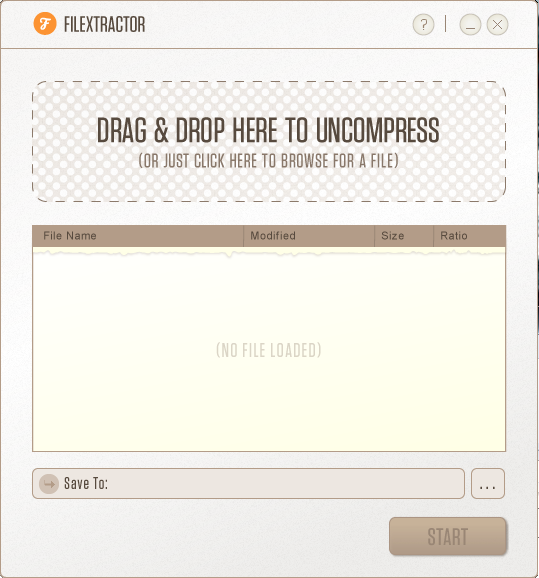
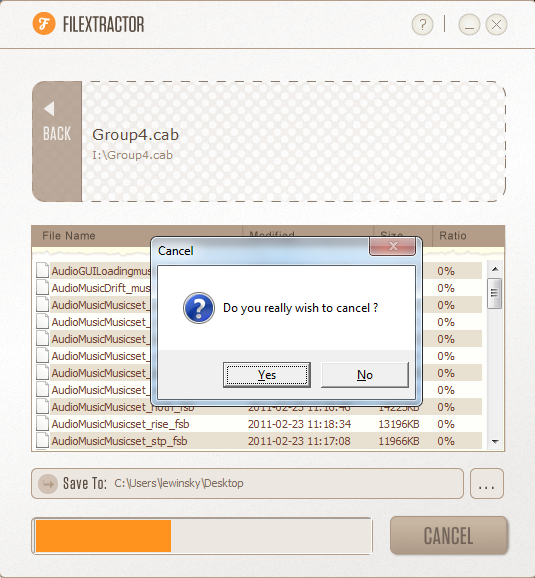
Extracting archive files has never been easier with FileExtractor freeware. To extract any archive, all you have to do is drag and drop the archive file or click on the enclosed rectangular section to browse for files. Unfortunately drag and drop is only enabled on the enclosed triangular section. Once the file is loaded, the program lists the contents of the archive. The list contains vital information like filename, size, date modified and compression ratio. Proceed to choose the destination folder or use the default which is the compressed file’s current directory. Then click Start. A progress bar takes you through the process. If you wish to cancel the process, click the Cancel button. The program prompts you to confirm your selection with a dialog box. To cancel click Yes and to continue extraction click No.
A confirmation message is displayed to inform you that the process was completed successfully.
Opinion
The extract files program is very simple to use. It also manages to extract big files while consuming minimal system resources. The drag and drop feature sets it apart from much of the competition. File validation was well done as the program does not allow users to drop unsupported files. The program however had a few shortcomings. First it did not make sense to have drag and drop supported on only a section of the interface. The program allowed me to extract an archive twice to the same destination folder without prompting me to confirm whether I wanted to replace the existing files. The publisher seemed to have exaggerated the capabilities of the program by stating that it could decompress JAR files which it clearly does not. It is really inconvenient that you cannot decompress files in batch. It was quite unusual that you are able to drag and drop other files while the program is still decompressing others and when it finishes it clears the file list before files added later were extracted.
Verdict
Free File Extractor succeeds in making archive extraction easy and fast but the program could do with a little more work.
